Compare two pipes: what 30 mm of header does
Tutorial 2 · about 15 minutes plus one sweep
“How much does a longer header move the powerband?” comes up again and again on the pipe threads. The rule of thumb says a longer pipe peaks lower and pulls harder lower down. It doesn't say by how much, or what you give up over the top.
In this guide you answer it for one engine. You change one dimension of the chamber, the header length, run both pipes over the same rpm points, and read the difference in three places: the tuned-rpm badge, the power curves and the wave diagram.
It follows on from Your first expansion-chamber sim. You need the 125 moto-X project from that guide and its first sweep. Like that guide, it runs on WaveDyno's free plan with daily run limits, and this one costs a second sweep.
Why the header
The header is the first section of the pipe, from the exhaust port to the diffuser. Making it longer moves the whole chamber further from the port. The diffuser and the baffle keep their shape. Both reflections, the suction wave from the diffuser and the plugging wave from the baffle, have the same extra distance to travel. If the wave speed and the engine's operating state stayed the same, both would arrive back at the port later by the same amount.
That makes it the cleanest single change to learn from. Lengthen the belly instead and only the plugging wave moves. Change the diffuser and the two move by different amounts. Each of those is a comparison of its own.
1. Start from your baseline
Click Compare in the Dyno chart header to open Compare dyno runs. Your first sweep is listed there.
If you finished the first guide and changed nothing since, the project is exactly as the wizard built it and that sweep is its baseline. If you've edited anything since, put it back first: click your first run's restore icon (its tooltip says Restore engine, sweep, and quality settings from …) and confirm with Restore settings. Your run history is kept.
While the dialog is open, name the run so the comparison is readable later. The name field on each run is editable. Call it baseline.
2. Three rpm numbers, and a prediction
By now the project has three different rpm figures, and it helps to keep them apart:
- 12,500 rpm is the Target peak rpm you left in the setup wizard. It's what you asked for.
- 12,900 rpm is what the pipe is timed for. Open Build → Ducts: under the table, the badges read 843 mm total (every section added up) and tuned ≈ 12,900 rpm (the pipe's timing estimate, rounded to 100).
- 13,000 rpm is where your baseline sweep actually peaked: 27.2 kW (36.4 hp). On a 500 rpm step, that means it was the best of the points you ran.
The first is an input and the second is an estimate. Only the third is a simulated result, and none of the three has to agree with the others.
The tuned figure comes from the same wave-timing estimate as in the first guide, run the other way round. It takes the length from the port to the middle of the baffle and asks at what rpm a wave at 670 m/s gets there and back between exhaust opening and transfer closing. On this engine that window is 158° of crank.
Now work out what 30 mm more header should do to it:
port to mid-baffle   = 265 + 210 + 100 + 218/2 = 684 mm   (header, diffuser, belly, half the baffle)
with 30 mm more      = 714 mm

tuned rpm = 670 × 158 / (12 × length)
          = 670 × 158 / (12 × 0.714) ≈ 12,400 rpm   (was ≈ 12,900)
The extra 30 mm is 60 mm there and back. At 670 m/s that takes about 0.09 ms, which is about 7° of crank at 13,000 rpm. So the estimate is that both reflections arrive about 7° later, as long as the wave speed and the operating state don't change, and that the pipe's timing drops by about 500 rpm.
Write your prediction down. The point of the next steps is to find out how far the estimate holds, and what it leaves out.
3. Make the change
On Build → Ducts, in the Exhaust pipe table, click the L mm cell on the header row and add 30 mm:
| Section | L mm before | L mm after |
|---|---|---|
| header | 265.0 | 295.0 |
Leave every other cell alone, including all the diameters. Don't use scale lengths… for this. It multiplies every section except the stinger, which is a different experiment.
Check the badges again. mm total should be 30 mm higher, and tuned ≈ should read close to your prediction. If they don't, the edit didn't land where you meant it to.
They should read 873 mm total and tuned ≈ 12,400 rpm, and the label at the end of the chamber drawing reads 873 mm → atm.
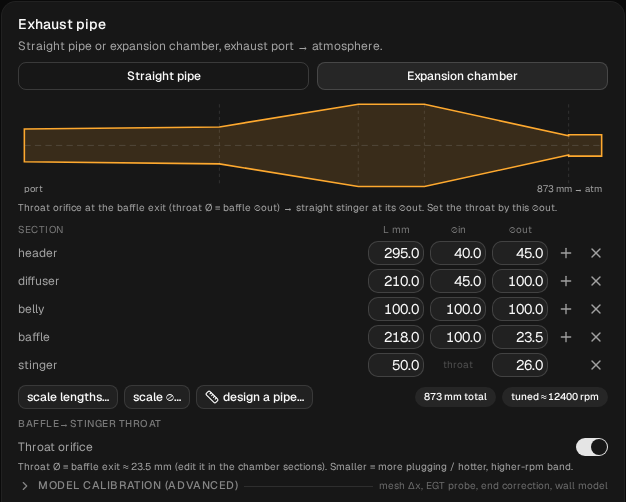
The badge now says the pipe is timed about 500 rpm lower, as predicted. Now find out what the simulation says.
4. Run the longer pipe
Open Run → Setup and check that From, To, Step and Quality are exactly what the baseline used (the saved sweep is 8,000 to 14,000 rpm, step 500, Standard). Comparison deltas only work when both runs sit on the same rpm points (Deltas require an exact baseline RPM match). If you started your baseline at 10,000 rpm to use less of your daily limit, start this one there too. Then click Run dyno.
The sweep counts against your daily limit. The Run dyno button shows an estimate before you start, and the amount actually charged can come in under it.
When it finishes, the chart becomes a Dyno comparison with a chip for each run: the new one marked primary, and your baseline. Open Compare and name the new run header +30.
Then check the run did what you meant. Click the description icon next to the run selector. Under Changes from previous run it lists two lines:
Exhaust › Num Elements: 99 → 102
Exhaust › Sections 0 › Length: 0.265 → 0.295
The second is your edit, in metres. The first is not a setting you changed: it's the number of cells the solver divides the pipe into, re-derived for the longer pipe at the same cell size. Any other line means something else changed, and the comparison isn't a one-change comparison any more.
As in the first guide, check that no point is drawn as a hollow circle with a red outline. A flagged point isn't a result. Don't compare its power until you've dealt with it.
5. Read the power curves
In Compare dyno runs, check that baseline and header +30 are both ticked (they will be, straight after the sweep), then click baseline on the baseline run. The chip on the chart doesn't do this for you: the dialog says it, Tooltip deltas appear only after you explicitly choose a baseline. Once it's set, Clear baseline appears at the top of the dialog.
Hover along the curve. The tooltip gives both runs' values at that rpm, and on header +30 the change from the baseline, in kW and in percent. To read it in hp, switch Run → Setup → Power unit. That only changes the display. Like every WaveDyno output, these are simulated estimates, and the comparison between them is what you're after.
Read it in three parts:
- Below the peak. This is where a longer pipe is supposed to pay, and on a moto-X bike it's the part you ride most: the pull out of a turn. The template this pipe comes from is described as wide powerband. How much did the longer header gain, and from what rpm?
- The peak. Did it move down, and by roughly as much as the badge predicted? Did the peak power go up, down or stay put?
- Above the peak. This is usually where you pay for it. The baseline already falls hard over the top, from 27.2 kW at 13,000 rpm to 13.1 kW at 13,500. How does the longer pipe compare there?
Then switch the second chart under the power curve to DR (delivery ratio). It shows both runs, and its tooltip lists both values (without a delta). How much fresh charge the engine takes in at each rpm is where the pipe's gains and losses start.
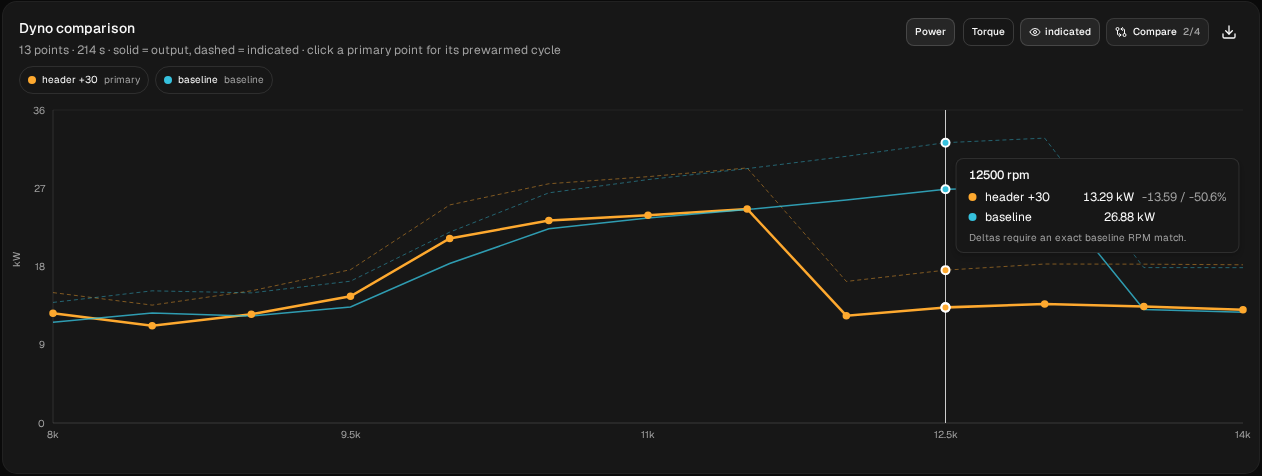
baseline (blue) against header +30 (orange), 8,000–14,000 rpm in 500 rpm steps. Solid: output power. Dashed: indicated. All plotted outputs are simulated estimates, not measurements.Here are both runs point by point, as the tooltips and the DR chart give them. They are from this guide's example sweep: 8,000–14,000 rpm, 500 rpm steps, Standard quality, sweeping upwards. A sweep started at 10,000 rpm wasn't run for this table, so if you took that option your rows start at 10,000 and may not match these exactly.
| rpm | baseline kW | header +30 kW | change kW | change hp | baseline DR | header +30 DR |
|---|---|---|---|---|---|---|
| 8,000 | 11.6 | 12.6 | +1.1 | +1.4 | 0.88 | 0.95 |
| 8,500 | 12.7 | 11.2 | −1.5 | −2.0 | 0.89 | 1.06 |
| 9,000 | 12.3 | 12.5 | +0.2 | +0.3 | 1.05 | 1.03 |
| 9,500 | 13.4 | 14.6 | +1.2 | +1.6 | 1.02 | 1.10 |
| 10,000 | 18.3 | 21.2 | +2.9 | +3.8 | 1.27 | 1.47 |
| 10,500 | 22.3 | 23.3 | +1.0 | +1.3 | 1.43 | 1.49 |
| 11,000 | 23.6 | 23.9 | +0.3 | +0.4 | 1.42 | 1.43 |
| 11,500 | 24.5 | 24.6 | +0.1 | +0.1 | 1.37 | 1.38 |
| 12,000 | 25.6 | 12.4 | −13.3 | −17.8 | 1.34 | 1.13 |
| 12,500 | 26.9 | 13.3 | −13.6 | −18.2 | 1.34 | 1.09 |
| 13,000 | 27.2 | 13.7 | −13.5 | −18.0 | 1.34 | 1.05 |
| 13,500 | 13.1 | 13.4 | +0.4 | +0.5 | 1.04 | 1.01 |
| 14,000 | 12.7 | 13.0 | +0.3 | +0.4 | 1.00 | 0.96 |
The baseline peaks at 27.2 kW (36.4 hp) at 13,000 rpm. The longer pipe peaks at 24.6 kW (33.0 hp) at 11,500 rpm. The curves cross four times: between 8,000 and 8,500 rpm, between 8,500 and 9,000, between 11,500 and 12,000, and between 13,000 and 13,500. With 500 rpm steps you can't say exactly where inside each gap.
So the longer header did move the power down, and it bought something for it: 2.9 kW (3.8 hp) more at 10,000 rpm, 1.0 kW at 10,500, and about the same as the baseline up to 11,500. The badge predicted about 500 rpm lower. The simulated fall-off moved much further. The longer pipe drops off the pipe between 11,500 and 12,000 rpm and makes about 13 kW from there on, while the baseline is still on the pipe at 26.9–27.2 kW from 12,500 to 13,000 and drops off between 13,000 and 13,500. At the final sampled point, 14,000 rpm, both are off the pipe and make about 13 kW.
That fall-off is the one part of this chart to read with care. WaveDyno shows falling off the pipe as a sharp step, sharper than a real dyno trace, and where the step lands can depend on the direction of the sweep: sweeping down from high rpm drops off lower than sweeping up. Both runs here sweep up, so they're comparable with each other. Read the direction and the shape of the change, not the kW just past the edge.
The badge is a timing estimate for a single wave speed. The sim solves the whole pipe, with the gas temperature changing along it and from one rpm to the next, so the two needn't agree. The badge is a first estimate of where the pipe works. It doesn't tell you where the engine drops off the pipe. A real dyno is what settles it.
6. See why in the wave diagram
The power curves tell you what changed. The wave diagram tells you why.
Only one run at a time is loaded into Cycle analysis and Wave diagram: the dialog calls it the primary run. Right after the sweep, that's header +30.
- On the Dyno chart, click the 13,000 rpm point of
header +30, then open Run → Wave diagram. - Open Compare again and click make primary on
baseline. Back on the Dyno chart, click the baseline's 13,000 rpm point and open Wave diagram. - Repeat both at 12,500 rpm.
A click loads the point the tooltip is showing, which isn't always the one under your cursor. Before you read a diagram, check the rpm in the Cycle analysis header (… kW ind. @ 13000). The power figure there is for the single prewarmed cycle, so it won't match the sweep exactly. Quote the sweep, not this.
Keep the three things from the first guide in view: the blowdown pulse leaving x = 0 when the exhaust opens, the blue suction wave from the diffuser that should reach the port between transfer opening and BDC, and the orange plugging wave from the baffle that should reach it just before the exhaust closes. Hover anywhere on the diagram for a readout of crank angle, distance and pressure, and hover on the dashed lines for the port events. On this engine the exhaust closes at 274°.
Each diagram scales its colours to its own pressure range, so compare where and when the waves arrive, not how bright they look.
Start with the baseline at 13,000 rpm. The orange plugging wave reaches the port at about 240° and peaks at about 2.2 bar around 266°, just before the exhaust closes at 274°. At the moment the port closes, the pressure there is still about 1.7 bar, holding the charge in. That's a pipe working as designed. At 12,500 rpm the picture is the same, a few degrees earlier.
Now the longer pipe at the same rpm. The plugging wave reaches the port at about 290° and peaks at about 1.7 bar around 297°. That's after the exhaust has closed. As the port closes, it sees suction instead (0.6 to 0.8 bar), which pulls charge out rather than holding it in. The blowdown pulse at the top of the diagram is weaker too: about 1.8 bar against 2.6 for the baseline at 13,000 rpm.
The plugging wave arrives about 50° later, but 30 mm of extra travel only accounts for about 7°. The rest is the difference between an engine on the pipe and one that has fallen off it. Off the pipe, the blowdown is weaker and the plugging wave comes back too late to do its job. That's the 13 kW plateau in step 5, and the delivery ratio falling from 1.3 to about 1.0.
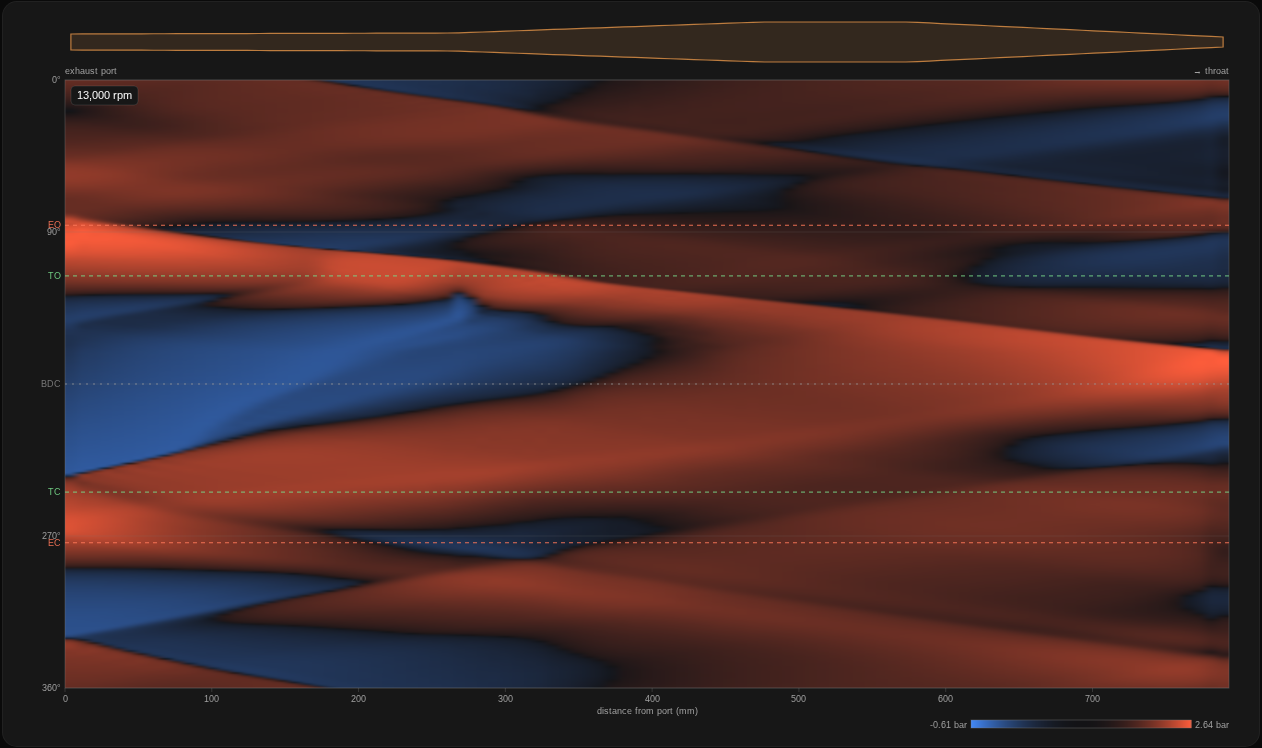
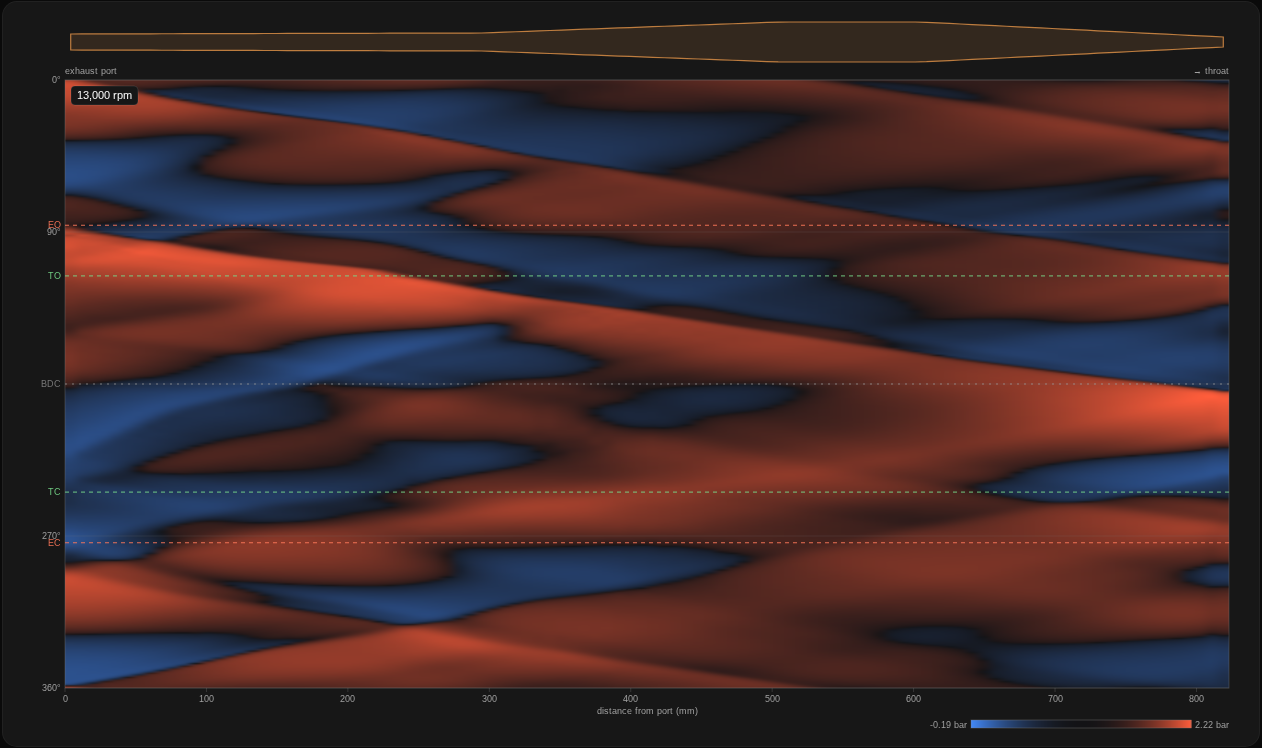
baseline (top) and header +30 (bottom). Each is colour-scaled to its own pressure range.The gains and losses on the power curve come from these arrival times moving in and out of the port-timing windows. At 12,500 and 13,000 rpm, the longer pipe's plugging wave misses the window altogether.
What to take from it
You now have an answer for one engine instead of a rule of thumb: 30 mm of header bought more pull from 9,500 to 10,500 rpm, most of it at 10,000, and cost the top of the powerband, because in these ascending sweeps the engine now drops off the pipe about 1,500 rpm earlier. The tuned badge said about 500 rpm. That gap is the reason to run the sim and not stop at the arithmetic. You also have a way of checking any answer like it.
- Try the other direction. Restore the baseline and make the header 30 mm shorter. Is the effect symmetrical?
- Change one thing at a time. Belly length, baffle angle and diffuser shape each move the reflections differently. Run each as its own pair against the same baseline.
- Keep the baseline sweep. Every comparison needs exactly the same From, To and Step. Keep it sweeping upwards, as the saved sweep does, because the fall-off can land elsewhere on a sweep that goes down. If you change the sweep, run a new baseline first.
- Check it on your own engine. Enter your measurements in the setup wizard and run the same pair on your own pipe. If you have a real dyno sheet for both lengths, join the tester programme: that comparison is what we most want to see.
WaveDyno is a 1D gas-dynamics simulator. Its results are estimates from a physical model, not measurements. Use them to compare designs and to understand what the pipe is doing, and confirm on a real dyno before cutting metal you can't replace. See the Terms of Service, section 4.