Your first expansion-chamber sim
Getting started · about 15 minutes
This guide covers building an engine, sweeping it across the rev range, and reading what the expansion chamber does to the cylinder. The example is a 125 cc motocross engine, one of WaveDyno's built-in archetypes. If you have your own engine, follow the same steps and enter your own measurements as you go.
You need a browser and WaveDyno's free plan with daily run limits. Nothing is installed. The simulation runs on our servers, and your projects are stored with your account.
1. Open the app and create an account
Go to app.wavedyno.com and sign up. The free plan includes every feature. Runs are paid for from a daily allowance of work units, which resets at midnight UTC. The Daily usage bar in the header shows how much of today's allowance you've used.
A sweep costs more with more rpm points, lower rpm, a lower CFL number and a higher quality setting. Before you start, the Run dyno button shows what the sweep will cost, in work units and as a share of the day's allowance. You're charged for the compute actually used, never more than that estimate.
2. Build the engine with the setup wizard
On a new account the Setup wizard opens by itself and stays open until you've created a project, so you start here. Later, to build another project, click the + button next to the project name (its tooltip says New project).
You answer what you can measure, and the rest comes from the archetype. You can skip any step, and every value can be edited later in the Build tabs.
The wizard has five steps.
1. Engine. Under Engine archetype, choose 125 moto-X / enduro. (The wizard starts on 125 road race, so change it.) It is a 125 motocross engine with a shaped multi-port cylinder, reed intake, individual transfer ducts and a broad expansion chamber, seeded from a detailed 54 × 54.5 mm moto-X setup. Leave the defaults as they are:
| Field | Value |
|---|---|
| Bore | 54 mm |
| Stroke | 54.5 mm |
With your own engine, enter the bore, stroke, con-rod length and compression ratio here. The compression ratio is geometric (full-stroke), roughly twice the trapped ratio a spec sheet usually quotes. Hover the field for the reminder.
2. Cylinder ports. You can enter the port timing in whichever form you measured it: Opens (° ATDC), Duration (°) or Depth from deck (mm). The archetype's values:
| Port | Opens | Duration |
|---|---|---|
| Exhaust | 86° ATDC | 188° |
| Transfers | 116° ATDC | 128° |
The same step has Transfer ports and Exhaust window pickers. Leave them as the archetype set them.
3. Intake. Reed — ideal, which the archetype preselects. Leave it. The app's description of this engine mentions a six-petal reed block, but the project models the reed as an ideal valve: a zero-lag, one-way check valve, with no petal dynamics.
4. Exhaust. The archetype preselects everything here: Exhaust system Expansion chamber, Pipe template Moto-X / enduro 125, Power level Strong (donor as-built) and Target peak rpm 12,500. Check them and leave them as they are.
5. Fuel & ignition. Pump gasoline + premix and Retard curve are preselected, with Advance (low rpm) 20.5 and Advance (peak rpm) 10.0 °BTDC. Leave them. The wizard shows only those two numbers, but the project keeps the archetype's full four-point curve: 20.5° BTDC at 10,150 rpm, 15° at 11,500, 10° at 12,750, just past the wizard's target peak rpm of 12,500, and 0° at 13,850. Once the project exists you can see it under Build → Combustion.
If you edit the ignition answers for your own engine, the wizard replaces that curve with two points: your low-rpm advance at 65% of the target peak rpm, and your peak advance at the target.
The strip along the bottom of the wizard shows the result as you go: displacement (about 124.8 cc), bore × stroke rounded to whole millimetres (54×55 mm), the exhaust and transfer durations, a pipe ≈ … rpm badge, and any setup warnings. The wizard suggests a Project name; change it if you like, then click Create project.
Build → Engine then shows a note that the mean piston speed reaches 25.4 m/s at 14,000 rpm, above the road-engine norm of about 25 m/s. It is a durability note only and doesn't affect the simulation.
What the wizard does to the pipe
With the defaults above you get the donor chamber exactly as built. The Moto-X / enduro 125 template is normalised from a detailed 125 moto-X chamber with a long header, broad diffuser and compact belly, and while every answer stays at its default (Strong, 12,500 rpm, geometry untouched) the wizard keeps that chamber as it is.
Change the target rpm, the power level or your engine's numbers (bore, stroke, con-rod, the exhaust or transfer opening angle, the exhaust width or port layout, exhaust system or template) and the wizard rebuilds the pipe from the template instead. Length follows the target rpm, and diameters follow the exhaust-port area.
The length it rebuilds to is the classic wave-timing estimate. The pressure pulse has to travel down the pipe and back in the time between exhaust opening and transfer closing:
tuned length = a × Δθ / (12 × rpm)

a   = 670 m/s        wave speed WaveDyno assumes in hot exhaust gas
Δθ  = 244° − 86°     transfer close minus exhaust open = 158°
rpm = 12,500

tuned length = 670 × 158 / (12 × 12,500) ≈ 0.706 m
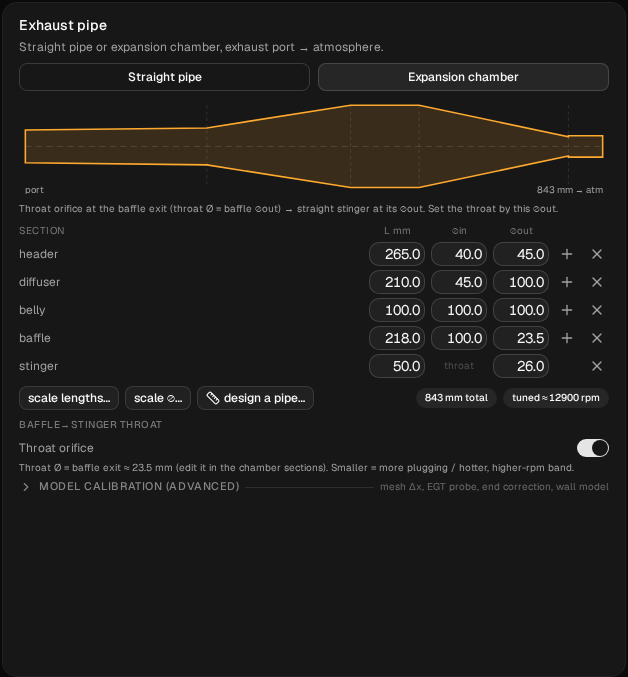
That gives about 706 mm, measured from the port to the middle of the baffle. The donor chamber as built measures about 684 mm, some 20 mm shorter. The formula is a starting point, not the answer, and the two don't have to agree: for the pipe as built, the tuned ≈ badge on the Build tab (below) reads about 12,900 rpm. Set the target to 11,500 rpm and the rebuilt pipe grows to about 767 mm. The pipe gets longer as the target rpm goes down, which matches the rule of thumb.
Power level works on the restriction at the end of the pipe. Mild (broad, cooler) opens the baffle exit and the stinger up by 8%. Strong (donor as-built) leaves them alone. Max (peaky, hotter) closes them down by 7%. Picking Mild or Max also triggers the rebuild from the template, so it changes more than those diameters.
Open Build → Ducts to see the chamber. The Exhaust pipe card has a Straight pipe | Expansion chamber toggle and a table with one row per section. For this pipe the rows are header, diffuser, belly, baffle and stinger. The columns are section, L mm, ⌀in and ⌀out. On each row, + inserts a cone after it and × removes it.
Below the table are scale lengths… and scale ⌀…, and two badges: the total length (N mm total) and the rpm the pipe is tuned for (tuned ≈ N rpm). Under those, the Baffle→stinger throat group has a Throat orifice switch. It is on for this pipe, and the note beside it says what that means: Throat Ø = baffle exit.
3. Set up the dyno sweep
Open Run → Setup. The Dyno sweep card controls which rpm range Run dyno sweeps and how hard each point is settled.
- From / To. The archetype's saved sweep is 8,000 to 14,000 rpm. That's wide: it starts well below the 13,000 rpm peak, so you see how the engine pulls on the way up as well as where it peaks. Leave it for this guide.
- Step. 500 rpm, which gives 13 points here. That's enough for a first survey. Use 250 rpm around the peak later, because the dip between resonances is narrow.
- Quality. Leave it on Standard. Fast (draft) suits quick checks. High (slow) is for final numbers.
For your own engine, a wider range shows more: start well below the expected peak to see the engine come onto the pipe, and end past it to catch the fall-off. When you type in your own target peak rpm, the wizard sets a range of about 0.6× to 1.12× that target.
Every extra point costs run time and daily allowance, so keep the first sweep coarse. If a 13-point sweep costs more than you want to spend today, start From at 10,000 rpm instead. You lose the bottom of the curve, but the peak stays in range.
4. Run it
Click Run dyno in the header. The first point is a cold start and takes longest. After that, each point starts from the one before it, and the points appear on the power curve as they converge.
WaveDyno tells you which points it doesn't trust instead of plotting them silently. Flagged points are drawn as hollow circles with a red outline. A point can be flagged in two ways:
- Convergence failed. The point didn't settle within its cycle limit. The flag lists what was still changing.
- High cycle scatter. The point converged, but its IMEP varied by more than 5% from cycle to cycle.
The flag says what to do: Lower CFL and rerun before using its power or torque. The setting is CFL number, under Setup → Solver & numerics (advanced), which you expand. The note under the field says the presets start at 0.4 or 0.5; a project built from this archetype starts at 0.5.
Here is the finished sweep from a run with exactly the settings in this guide (Standard, 8,000–14,000 rpm in 500 rpm steps). All 13 points converged and none was flagged. Run time varies; the app shows each finished sweep's time above its chart.
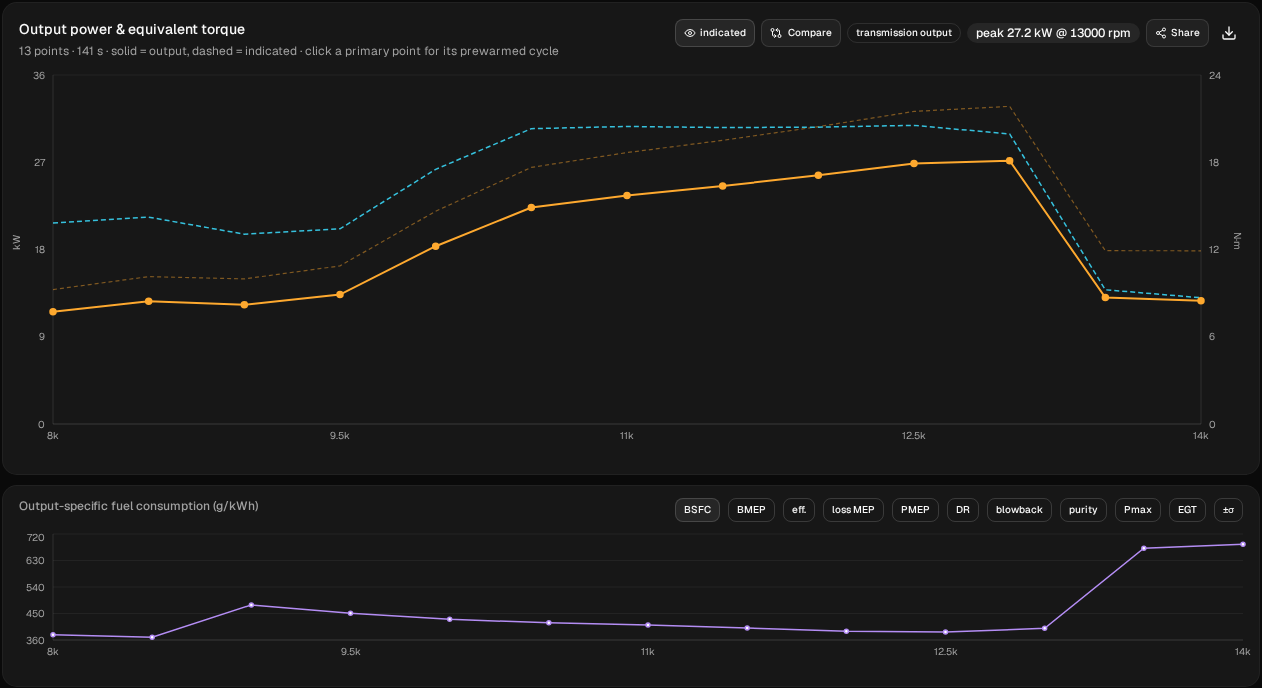
The highest sampled power is 27.2 kW (36.4 hp) at 13,000 rpm. The engine comes onto the pipe between 9,500 and 10,500 rpm, where output climbs from 13.4 to 22.3 kW. It stays within 10% of that from 11,500 to 13,000 rpm, then falls away hard, to 13.1 kW at 13,500 rpm and 12.7 kW at 14,000.
Under the power curve is a second chart that plots one more quantity across the rpm range. Its toggles include BSFC, BMEP, eff., loss MEP, PMEP, DR (delivery ratio), blowback, purity, Pmax, EGT and ±σ. Power can be shown in kW or hp (Setup → Power unit). The simulation itself is unaffected.
5. Look inside one point
Click a point near the peak of the power curve. The chart's subtitle says it: click a primary point for its prewarmed cycle. The app loads that point and opens Run → Cycle analysis.
Cycle analysis shows the point from the cylinder's side: crank-resolved cylinder, crankcase and exhaust-port pressure, and the port mass flows. The tiles give the numbers: BMEP (with IMEP beneath it), crankcase pumping, BSFC, delivery ratio, trapped purity and exhaust gas temp, plus peak pressure, charge temperatures, indicated → output, and power and torque.
Now open Run → Wave diagram for the same point. It plots pressure along the whole exhaust system over 360° of crank rotation, with TDC at the top: crank angle on one axis, distance from the port on the other.
Look for three things:
- The blowdown pulse. The bright pulse leaving the port (x = 0) when the exhaust opens.
- The suction wave (blue). The diffuser reflects it back. It should reach the port between transfer opening and BDC, so that it pulls fresh charge up through the transfers.
- The plugging wave (orange). The converging baffle reflects it back. It should reach the port just before the exhaust closes, so that it pushes escaping charge back into the cylinder.
At the rpm the pipe is tuned for, both reflections arrive in their windows. Now go back to Dyno, click a point well below the peak and open Wave diagram again. Then do the same with a point well above it. The waves arrive at the port at the wrong crank angles. That is the power curve's shape, explained.
Next steps
- Compare pipes. Compare two pipes changes one dimension of this chamber and measures the difference against this baseline.
- Your own engine. Run the wizard again and enter your own measurements: bore, stroke, port timing and widths, intake type, target peak rpm. Anything you can't measure can stay at the archetype value.
- Check the sim against your dyno sheet. If you have an engine with known specs and a real dyno chart, join the tester programme. Testers get unlimited runs in exchange for telling us where the sim matches and where it misses.
WaveDyno is a 1D gas-dynamics simulator. Its results are estimates from a physical model, not measurements. Use them to compare designs and to understand what the pipe is doing, and confirm on a real dyno before cutting metal you can't replace. See the Terms of Service, section 4.