Tune a 50 cc moped pipe: what a longer chamber buys, and what it costs
Tutorial 3 · about 20 minutes plus four sweeps
Ask on any moped forum how to move a pipe's powerband lower and you get two answers: make the chamber longer, or drop the transfer timing a few degrees. Both are right in direction. Neither tells you how much you gain lower down, or what you give up at the top.
In this guide you build a 50 cc piston-port engine in WaveDyno, sweep it, then change one thing at a time and read what moved: the transfer timing, the chamber length and the stinger. Each change is its own run against the same baseline.
The method is the same one as in Your first expansion-chamber sim and Compare two pipes, which use a 125 cc motocross engine. You don't need to have done them first, but tutorial 2 explains the comparison tools in more detail.
Everything here runs on WaveDyno's free plan with daily run limits. Each sweep in this guide has 19 points and counts against the daily limit. The Run dyno button shows the estimate before you start.
The engine
The example is a generic 50 cc piston-port single, the kind of sport cylinder that's common in the moped scene:
| Bore × stroke | 38 × 44 mm (49.9 cc) |
|---|---|
| Exhaust | single window, 25.5 mm wide, 170° duration |
| Transfers | 120° duration, five windows (an A pair, a B pair and one boost port), 58 mm total width |
| Intake | piston port, 145° duration, window 24.7 mm wide, 21 mm carb |
| Pipe | expansion chamber built by WaveDyno for 7,900 rpm |
It isn't anyone's actual engine. The intake window, the carb and the transfer width are reasonable assumptions for a cylinder like this, and the settings you don't enter (con-rod length, compression ratio, crankcase ratio, the ignition curve) come from WaveDyno's 125 road race template. If you have your own engine, enter your own numbers as you go. Your results will differ from these, and that's the point.
1. Build the engine with the setup wizard
Open the Setup wizard (on a new account it opens by itself; otherwise click the + next to the project name). There's no 50 cc archetype, so start from the closest one and change what matters.
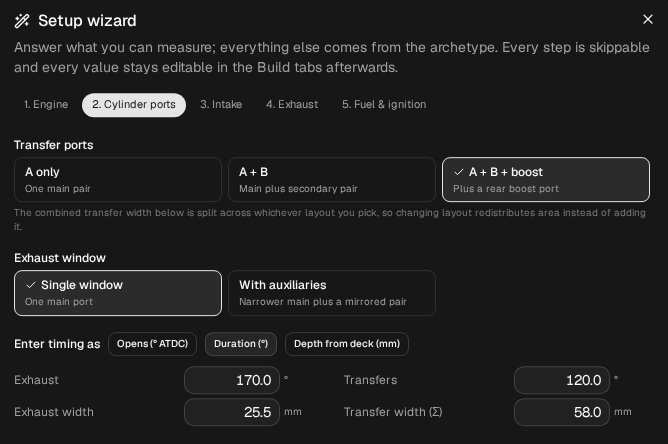
1. Engine. Leave Engine archetype on 125 road race. Enter:
| Field | Value |
|---|---|
| Bore | 38.00 mm |
| Stroke | 44.00 mm |
Leave Con-rod length (120.0 mm), Compression ratio (15.00) and Case compression (1.40) as they are. The compression ratio is geometric (full-stroke), not the trapped figure most spec sheets quote.
2. Cylinder ports. Set:
- Transfer ports: A + B + boost (main pair, secondary pair, rear boost port);
- Exhaust window: Single window;
- Enter timing as: Duration (°);
- Exhaust 170, Exhaust width 25.5 mm;
- Transfers 120, Transfer width (Σ) 58.0 mm.
Enter the transfer width after bore and stroke. The wizard splits the total across the five windows for you. The app keeps them as three entries, one for each pair and one for the boost port.
3. Intake. Choose Piston port. Set Intake effective Ø to 21.0 mm (the carb) and leave Tract length at 120 mm. Leave the Window width field at the value it offers (28.5 mm, three-quarters of the bore); you set the real intake window in step 2.
4. Exhaust. Exhaust system: Expansion chamber. Leave Pipe template on Road race 125 and Power level on Strong (donor as-built). Set Target peak rpm to 7900.
5. Fuel & ignition. Leave Pump gasoline + premix and the Retard curve at 24° BTDC (low rpm) and 15° (peak rpm).
The strip at the bottom should read 49.9 cc, 38×44 mm, ex 170° ×1 · tr A 120° and pipe ≈ 7900 rpm. Name the project and click Create project.
2. Set the intake port
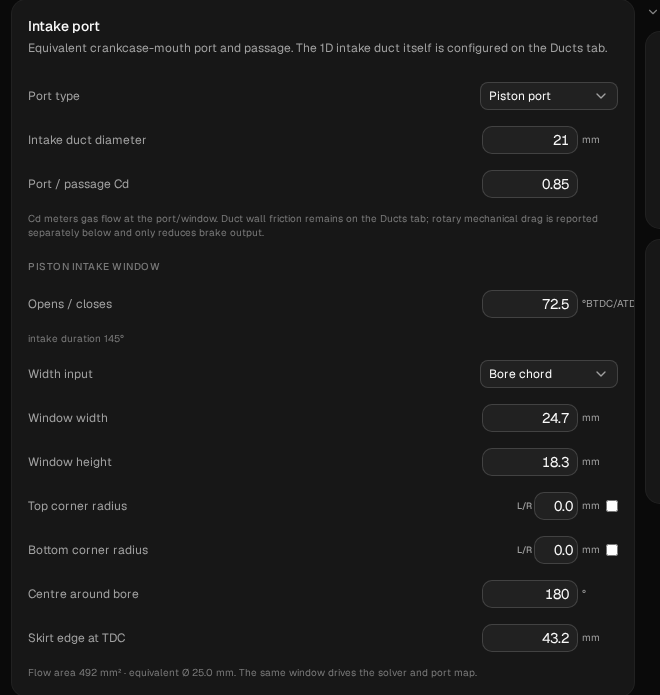
The wizard asks for the carb size but not the intake timing, so the piston-port window still has the 125's values. Open Build → Ports and scroll to the Intake port card. Port type should already read Piston port and Intake duct diameter 21. Set:
| Field | Value |
|---|---|
| Opens / closes | 72.5 °BTDC/ATDC |
| Window width | 24.7 mm |
| Window height | 18.3 mm |
| Skirt edge at TDC | 43.2 mm |
Piston-port timing is symmetric, so the one field sets both: the port opens 72.5° before TDC and closes 72.5° after, 145° in all. The field shows 72.5, and the line under it reads intake duration 145°.
The wizard scales the window height and the skirt edge from the 125 to your stroke, so it offers smaller values than these. Type them in anyway: they are the ones every run in this guide used. The line under the card should then read Flow area 492 mm² · equivalent Ø 25.0 mm.
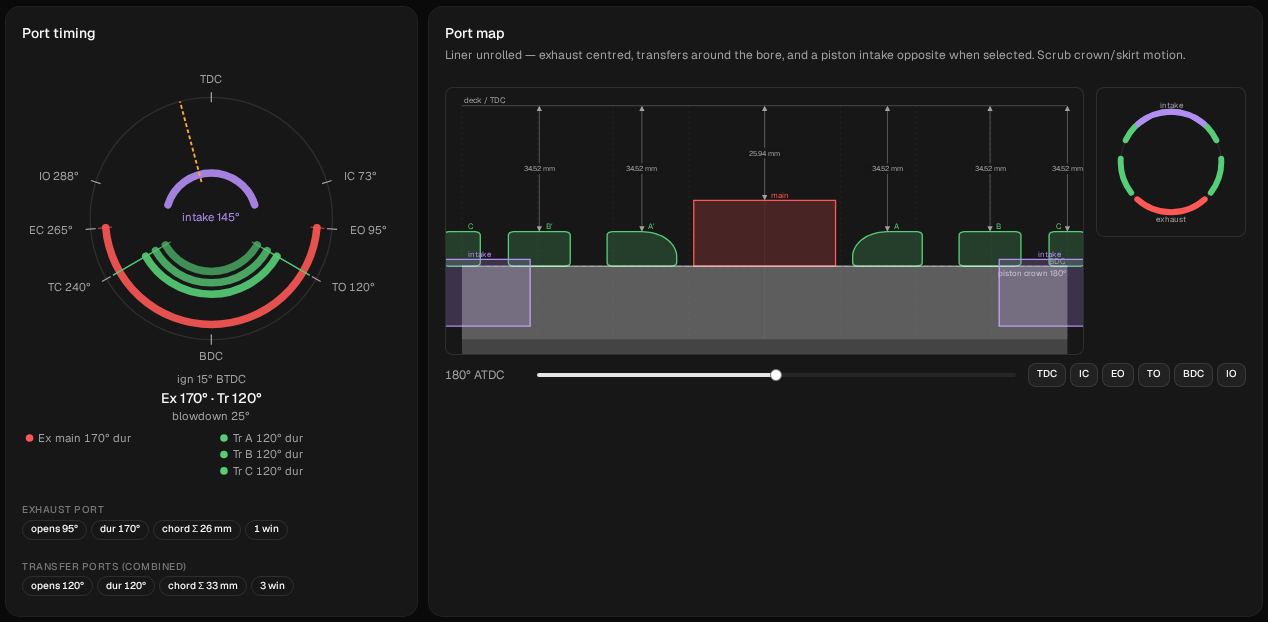
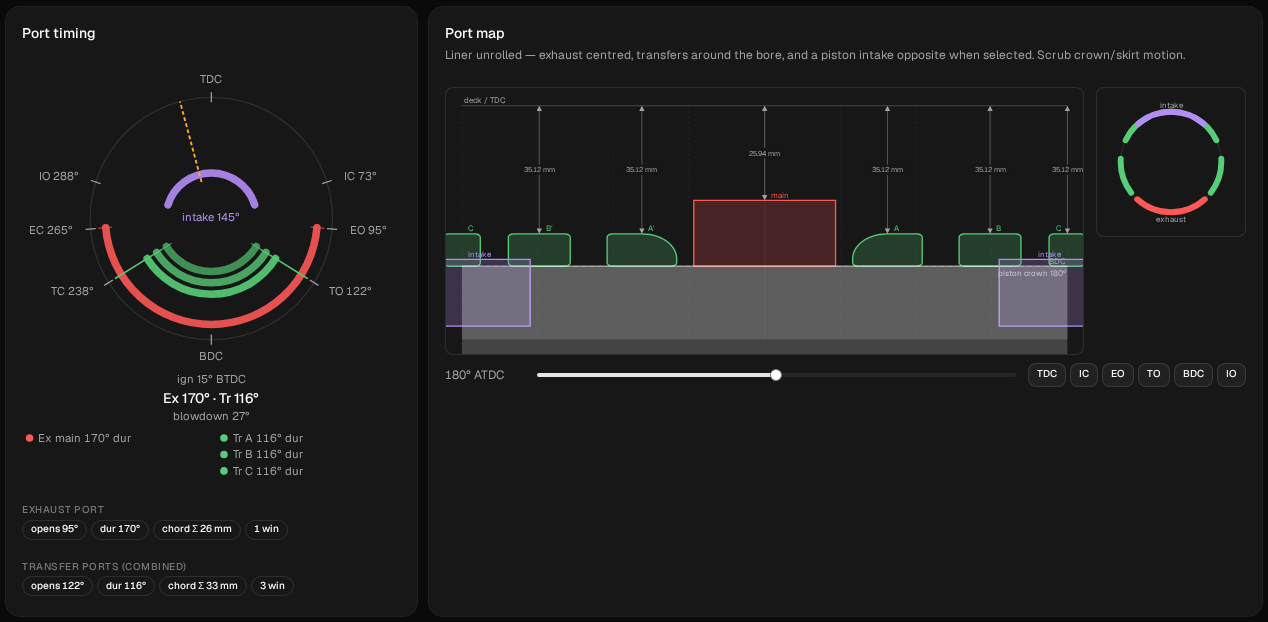
Check the Port timing ring at the top of the tab. It should read Ex 170° · Tr 120° and intake 145°, with IO 288° and IC 73° round the edge. There should be no warning banner on the tab.
3. Look at the pipe, and three rpm numbers
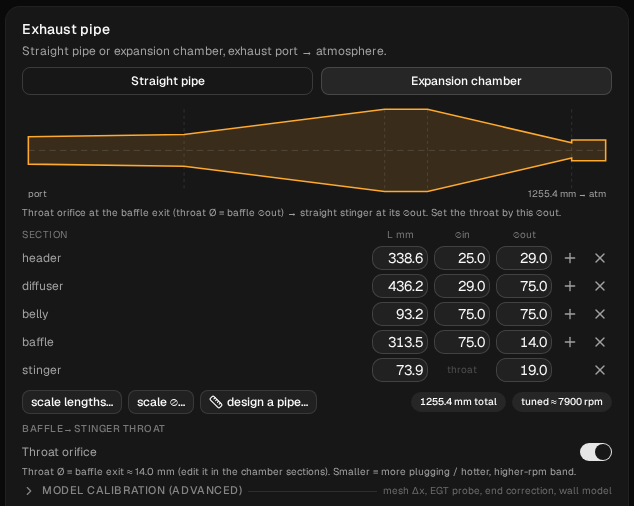
Open Build → Ducts. The wizard built the chamber from the road race template, scaled for 7,900 rpm and for this engine's exhaust port:
| Section | L mm | ⌀in | ⌀out |
|---|---|---|---|
| header | 338.6 | 25.0 | 29.0 |
| diffuser | 436.2 | 29.0 | 75.0 |
| belly | 93.2 | 75.0 | 75.0 |
| baffle | 313.5 | 75.0 | 14.0 |
| stinger | 73.9 | throat | 19.0 |
The badges under the table read 1255.4 mm total and tuned ≈ 7900 rpm.
As in tutorial 2, keep three rpm figures apart. 7,900 is the target you typed into the wizard. Tuned ≈ 7900 is the badge's timing estimate for the pipe it built. The third, where the simulated power actually peaks, only comes from a sweep.
4. Set up the sweep
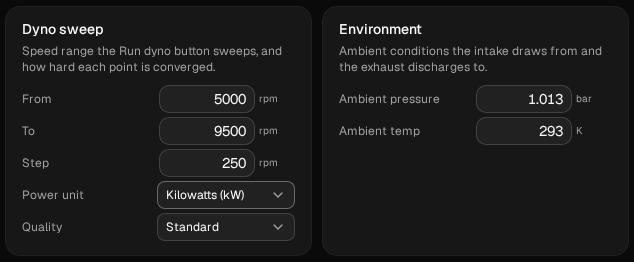
Open Run → Setup. The wizard suggests 4,500 to 9,000 rpm in 500 rpm steps. Change it to:
| Field | Value |
|---|---|
| From | 5000 |
| To | 9500 |
| Step | 250 |
| Quality | Standard |
That's 19 points. The finer step matters on this engine: the baseline falls by 44 % between two points 250 rpm apart, and a 500 rpm step would blur where. Leave Ambient pressure (1.013 bar) and Ambient temp (293 K) as they are.
Keep these four values for every run in this guide. Comparison deltas only work between runs on exactly the same rpm points.
5. Run the baseline and read it
Click Run dyno. When the sweep is done, open Compare in the Dyno chart header and name the run baseline.
First check that no point is drawn as a hollow circle with a red outline. A flagged point isn't a result. (In our run, all 19 converged.)
The baseline, point by point where it matters (the app shows kW or hp; PS is kW × 1.36):
| rpm | kW | PS |
|---|---|---|
| 5,500 | 3.86 | 5.25 |
| 6,000 | 6.04 | 8.21 |
| 6,250 | 6.56 | 8.92 |
| 6,500 | 5.08 | 6.90 |
| 7,000 | 6.37 | 8.65 |
| 7,250 | 6.88 | 9.35 |
| 7,500 | 3.89 | 5.28 |
| 7,750 | 4.31 | 5.86 |
| 9,000 | 4.50 | 6.11 |
Three things to see:
- The highest sampled point is 7,250 rpm, at 9.35 PS (9.22 hp). That's 650 rpm under the badge's 7,900. The badge is an estimate from wave timing; the sweep is the simulation.
- The power climbs from 6,500 to 7,250 rpm, then falls 44 % by 7,500. 7,250 is only the highest point the sweep sampled. The curve's real maximum could lie a little below it or a little above it; with a 250 rpm step you can't say where, and you'd need a finer sweep around 7,250 to locate it. Step 5 of Compare two pipes explains why a drop off the pipe like this should be read with care.
- There's a hump at 6,250 and a dip at 6,500.
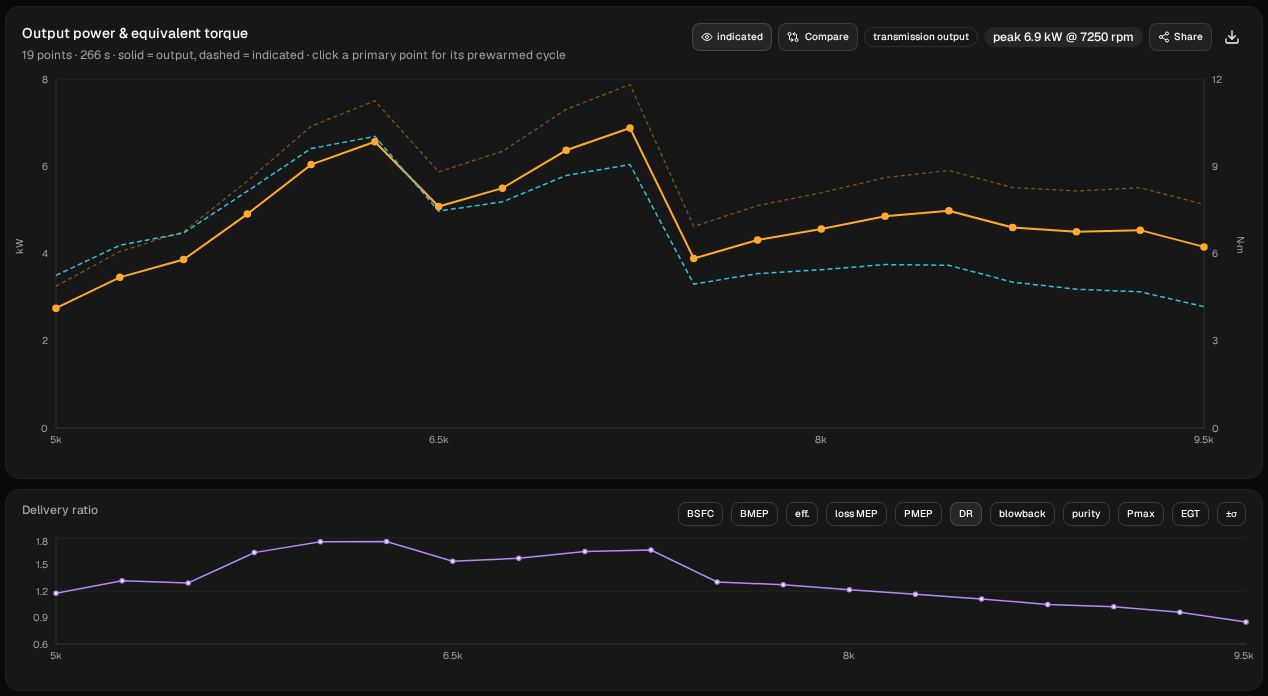
The absolute numbers run high for a 50. The model isn't calibrated against a dyno or tuned to any real engine, so use it to compare one change with another, not to predict what your moped makes.
6. First change: transfers at 116°
The usual advice for a lower band is to drop the transfer duration a few degrees. Try 116° instead of 120°, keeping the exhaust at 170°.
On Build → Ports, find the three transfer entries (A, B and C) in the Port windows card: one for each pair and one for the boost port, five windows in all. In each entry, change Opens from 120 to 122 °ATDC. Opening 2° later and closing 2° earlier takes the duration from 120° to 116°. The window heights follow on their own; that's the app working them out from the new timing. Leave everything else alone. The Port timing ring now reads Tr 116°.
Run the sweep and name the run transfers 116. In Compare, set baseline as the baseline so the tooltip shows deltas.
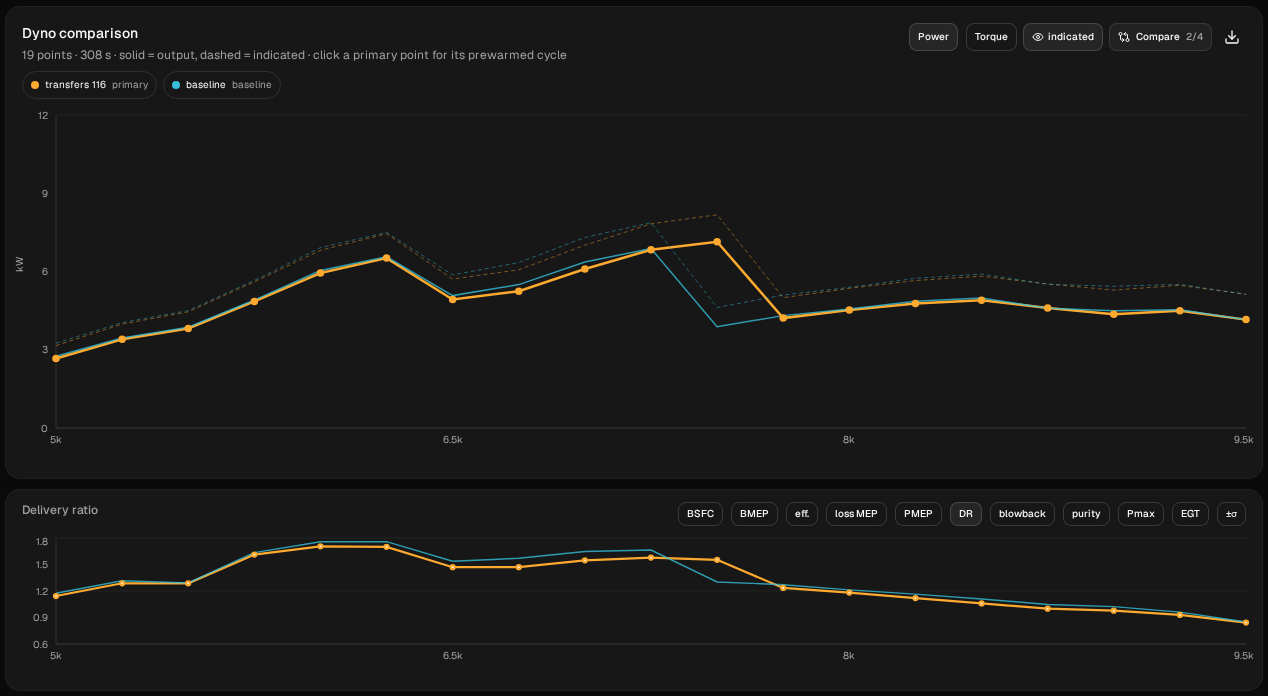
Here's what moved:
- The highest sampled point is at 7,500 rpm, 9.70 PS (9.57 hp), one step above the baseline's and 0.35 PS more.
- It costs a little almost everywhere. 16 of the 19 points are lower, by up to 0.38 PS (at 7,000). Two of the other three gain 0.01 PS or less. The third is 7,500, where it's 4.42 PS ahead: the baseline has already fallen off the pipe there, and transfers 116 hasn't.
- Nothing moved lower. The one place the shorter transfer timing buys something is at the top: it stays on the pipe one 250 rpm step longer, and falls off between 7,500 and 7,750 instead of between 7,250 and 7,500.
On this model, then, 4° of transfer duration doesn't move the band lower. It trims the curve slightly below the top and moves the fall-off one step up, the opposite of what you wanted. That may not hold on your engine, and it doesn't mean transfer timing never matters. It means the lever you'd reach for first didn't do what you wanted here, and one sweep told you so. Going the other way, on a 125, does move something: raising the transfers 1.5 mm left the power almost unchanged from 10,250 to 12,500 rpm, but the engine fell off the pipe 1,000 rpm sooner, between 12,500 and 12,750.
Now put the transfers back. Open Compare, click the restore icon on baseline and confirm Restore settings. Check that the ring reads Tr 120° again.
7. Second change: the chamber for 7,000 rpm
The other lever is the chamber itself. A longer pipe sends its reflections back later, so it should work at lower rpm. How much lower, and what does it cost?
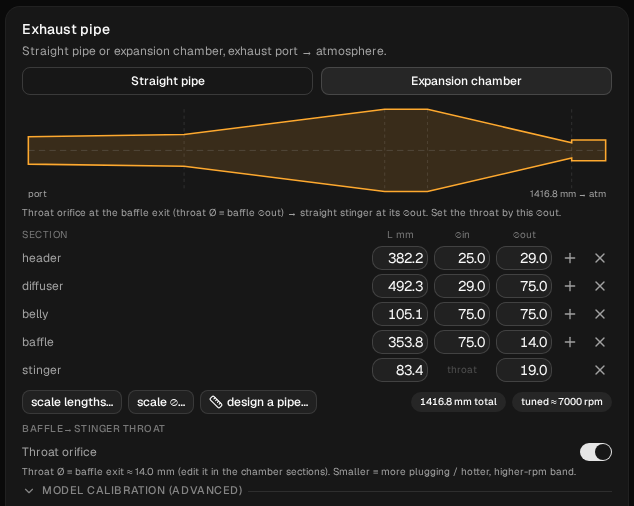
Make every section longer by the same ratio, 7,900 ÷ 7,000 ≈ 1.13, and leave the diameters alone. On Build → Ducts, type these into the L mm column:
| Section | L mm before | L mm after |
|---|---|---|
| header | 338.6 | 382.2 |
| diffuser | 436.2 | 492.3 |
| belly | 93.2 | 105.1 |
| baffle | 313.5 | 353.8 |
| stinger | 73.9 | 83.4 |
Type the values rather than using scale lengths…, so your pipe matches this one exactly. Don't touch the ⌀ columns.
Before you run it, predict. The badge assumes the tuned rpm goes as one over the length, so a pipe about 13 % longer should read about 11 % lower: 7,900 ÷ 1.13 ≈ 7,000. The badges now read 1416.8 mm total and tuned ≈ 7000 rpm. The pipe is 161 mm longer. If the badge is right, the highest point should move from 7,250 to somewhere around 6,250–6,500.
Why not just rerun the wizard with 7,000? It's quicker, but the wizard sets the ignition curve from the same target. At 7,900 it retards from 24° at 5,150 rpm to 15° at 7,900; at 7,000 it retards from 24° at 4,550 to 15° at 7,000. A new project from the wizard would change the pipe and the timing, and you couldn't tell which one did what. Editing the lengths changes only the pipe. You can check that under Build → Combustion: the curve still reads 5,150 / 24° and 7,900 / 15°.
Run the sweep and name it chamber 7000, then set baseline as the baseline in Compare.
Check that only the pipe changed. Don't rely on the run description for this (the icon next to the run selector): it lists Changes from previous run, and the previous run was transfers 116, so it also lists the transfer windows going back to 120°, and it can shorten the list to “+3 more”. Use Compare → Diff inputs against baseline instead. It should show only the five section lengths, plus the exhaust's Num Elements going from 99 to 111. That's the solver dividing the longer pipe into more cells, not a setting.
As in step 5, check the chart for flagged points first. In our run, all 19 converged again.
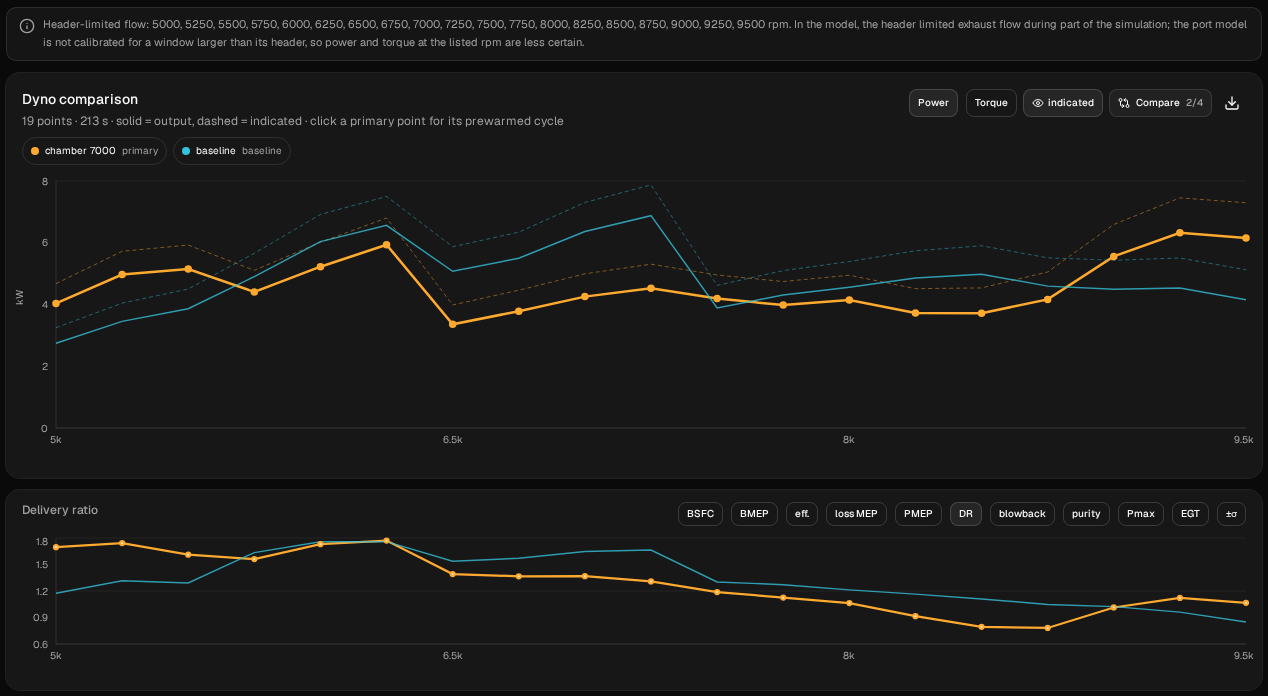
The grey “Header-limited flow” notice shows on every point of this engine: “In the model, the header limited exhaust flow during part of the simulation; the port model is not calibrated for a window larger than its header, so power and torque at the listed rpm are less certain.”
Point by point:
| rpm | baseline PS | chamber 7000 PS | change PS |
|---|---|---|---|
| 5,000 | 3.74 | 5.49 | +1.75 |
| 5,250 | 4.70 | 6.76 | +2.06 |
| 5,500 | 5.25 | 7.00 | +1.75 |
| 5,750 | 6.67 | 5.99 | −0.67 |
| 6,000 | 8.21 | 7.10 | −1.10 |
| 6,250 | 8.92 | 8.07 | −0.86 |
| 6,500 | 6.90 | 4.57 | −2.33 |
| 6,750 | 7.47 | 5.14 | −2.33 |
| 7,000 | 8.65 | 5.79 | −2.87 |
| 7,250 | 9.35 | 6.16 | −3.20 |
| 7,500 | 5.28 | 5.70 | +0.41 |
| 7,750 | 5.86 | 5.41 | −0.44 |
| 8,000 | 6.20 | 5.64 | −0.56 |
| 8,250 | 6.60 | 5.06 | −1.54 |
| 8,500 | 6.77 | 5.05 | −1.72 |
| 8,750 | 6.25 | 5.66 | −0.58 |
| 9,000 | 6.11 | 7.56 | +1.44 |
| 9,250 | 6.17 | 8.60 | +2.43 |
| 9,500 | 5.64 | 8.36 | +2.72 |
Read it in three parts.
The sweep doesn't show the peak where the badge said. The longer chamber's best point below 9,000 is 8.07 PS at 6,250, where the baseline already had its hump and was stronger. At 6,500 it drops to 4.57 PS, a dip rather than a peak, and from 6,750 to 7,250 it makes 5.14 to 6.16 PS. Its highest sampled point is 8.60 PS (8.48 hp) at 9,250 rpm, near the top of the sweep. The badge's 7,000 is a timing estimate, and none of the points bears it out.
What it bought. Below 5,750 rpm the longer chamber is clearly ahead: +1.8 to +2.1 PS from 5,000 to 5,500 rpm, where the baseline pipe isn't working yet. That's the low-rpm region you'd look at if your moped has to pull away from a standstill or climb in a tall gear. Whether it helps there is something to test on your own engine; this model can't tell you. It's also ahead from 9,000 rpm up, by 1.4 to 2.7 PS. The CSV alone doesn't say why the curve rises again up there, so treat that as something to check rather than something to use.
What it cost. At every point from 5,750 to 7,250 rpm the longer chamber is down, by up to 3.2 PS at 7,250. That's the whole range where the baseline makes its power. It's down again from 7,750 to 8,750. At 7,500 it's 0.4 PS ahead, only because the baseline has already fallen off the pipe there.
The second chart shows DR (delivery ratio): the fresh charge that flows in through the intake each cycle, compared with what the swept volume holds at ambient density. At 5,000 and 9,250 rpm it moves the same way as the power; at 7,500 it doesn't. At 5,000 rpm the longer chamber delivers 1.70 against the baseline's 1.18. At 7,500 it's 1.19 against 1.30, lower, where its power is higher. At 9,250 it's 1.12 against 0.96. DR counts the charge delivered, not how much of it stays in the cylinder, so read it as the pipe changing how much charge comes in, not as the explanation for the power.
So on this model a pipe 13 % longer didn't slide the curve 900 rpm down. It traded the middle of the band for the bottom and, less expectedly, the very top. If you want a lower peak, the length alone didn't give you one at any point here: at 6,500 it has a dip. One sweep told you that before you cut anything.
Restore baseline again before the last change.
8. A change that barely moves anything: the stinger
End-bleed holes and bigger stingers come up all the time. Here's the area-only version: open the stinger exit by the area of an 8 mm hole. On Build → Ducts, change the stinger's ⌀out from 19.0 to 20.62 mm. The table shows 20.6. The pipe's length badges don't change.
This models a bigger exit, not a separate hole in the pipe wall. Run it, name it stinger 20.62, and set baseline as the baseline in Compare.
As in step 7, check it with Compare → Diff inputs against baseline: only the stinger's ⌀out should differ.
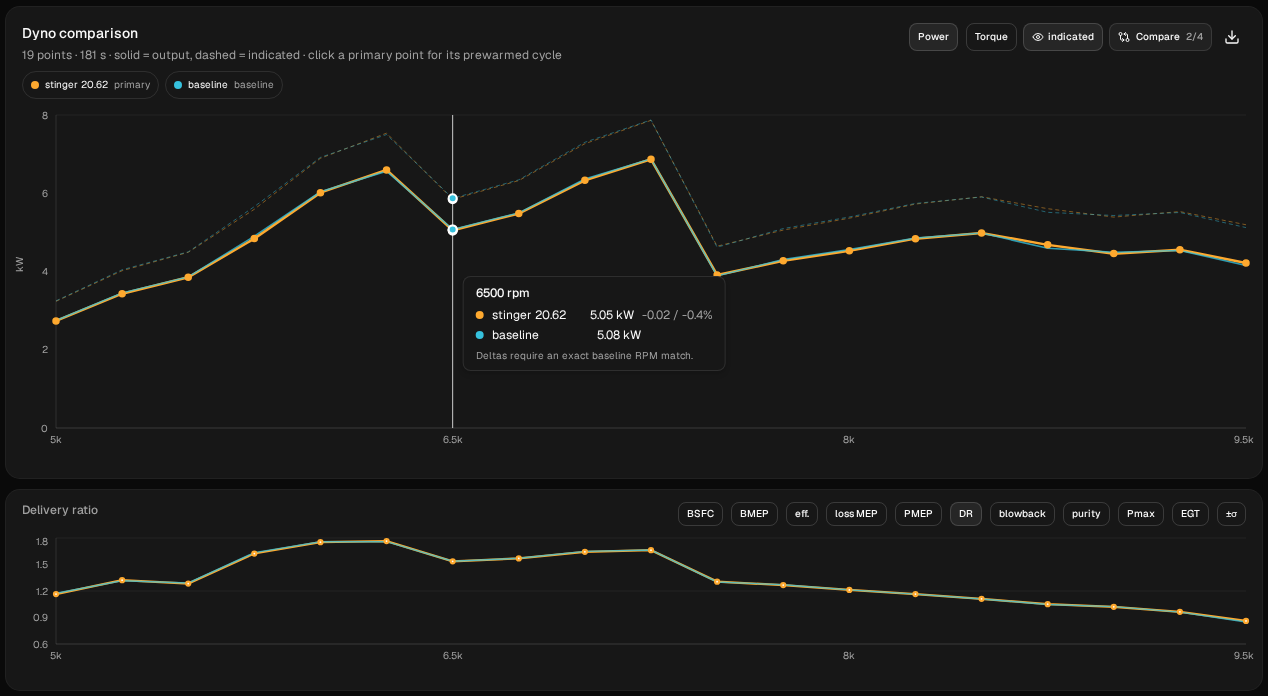
- The highest sampled point doesn't move. It stays at 7,250 rpm, 9.34 PS against 9.35.
- Everything else barely moves too. 18 of the 19 points change by less than 0.11 hp.
- The largest change is 0.115 hp, at 8,750 rpm. At 6,500, the dip from step 5, the power goes from 5.08 to 5.05 kW, −0.02 kW or 0.4 %. Right next to it, at 6,250, the change is 0.033 kW. At 7,750, just after the baseline's 44 % drop, it goes from 4.31 to 4.27 kW, −0.04 kW (−0.05 hp) or 0.8 %.
That's the lesson from this step. A change that comes up all the time moved no point on this model by more than about a tenth of a horsepower, not even the dip at 6,500 or the drop after 7,250, where the curve changes sharply. One sweep told you that too.
What to take from it
On this model, with this pipe:
- 4° less transfer duration moved nothing lower. It trimmed the curve slightly below the top and kept the engine on the pipe one step longer.
- A chamber 13 % longer bought 1.8–2.1 PS from 5,000 to 5,500 rpm and cost up to 3.2 PS from 5,750 to 7,250. None of its points shows a peak where the badge said; at 6,500 it has a dip. Its highest sampled point is at 9,250.
- A bigger stinger exit barely moved anything: no point by more than 0.12 hp.
Those are answers for one engine that you can check, not rules of thumb. And you now have a way of getting the same answers for yours:
- Enter your own engine. Bore, stroke, port timings, window widths and your carb. If you've measured your pipe, type its sections into Build → Ducts instead of using the wizard's.
- Change one thing at a time. Name each run, restore the baseline before the next change, and keep From, To and Step the same. Use Diff inputs to check that only one thing changed.
- Distrust single points. A flagged point isn't a result. A converged point that moves while its neighbours don't is a result, but check it with a finer sweep before you build on it.
- Check it on a real dyno. If you have dyno sheets for two pipes or two port timings on the same engine, join the tester programme. That comparison is what we most want to see.
These are simulated estimates from a 1D gas-dynamics model of a generic engine, not measurements, and not your engine. The model isn't calibrated against a dyno, and its absolute numbers run high for a 50. Even the differences between the runs hold only for this model. Use WaveDyno to compare designs and to understand what the pipe is doing, and confirm on a real dyno before cutting metal you can't replace. See the Terms of Service, section 4.