How a 2-stroke expansion chamber works: straight pipe vs chamber, in the wave diagram
Tutorial 5 · about 20 minutes plus two sweeps
Why do 2 strokes need an expansion chamber?
In a two-stroke, the piston opens and closes the exhaust port and the transfer ports. For most of the stroke around bottom dead centre, both are open at the same time, so the fresh charge coming up the transfers can flow straight across the cylinder and out of the exhaust. Nothing mechanical stops it.
An expansion chamber uses the exhaust pulse itself to manage that. When the port opens, a pressure pulse runs down the pipe. The widening cone (the diffuser) reflects part of it back as a suction wave, which pulls the burnt gas out of the cylinder and draws fresh charge up the transfers behind it. The closing cone (the baffle) reflects another part back as a pressure wave, which arrives at the port just before it closes and pushes the charge that escaped back into the cylinder. That second one is the plugging wave.
Both waves take a set time to travel the pipe, decided by its lengths and the gas temperature. The port opens and closes at fixed crank angles. So the waves only arrive at the right moment in one rpm band, and that band is where the engine is “on the pipe”.
That's the textbook answer. This guide shows it on one engine: you run it with a plain straight pipe, then with its expansion chamber, and change nothing else. Then you look inside the pipe at both.
Everything here runs on WaveDyno's free plan with daily run limits. Each sweep in this guide has 19 points and counts against the daily limit. The Run dyno button shows the estimate before you start.
The engine
The engine from Your first expansion-chamber sim: the 125 moto-X / enduro template with all its defaults. Build it as tutorial 1 does, with the setup wizard, and leave every answer at its default. It isn't anyone's actual engine.
Open Run → Setup and set the sweep to From 10000, To 14500, Step 250, Quality Standard, as in tutorial 4. That's 19 points. Leave the other fields as they are, and keep these four values for both runs: Compare only shows a delta where both runs have the same rpm (Compare two pipes).
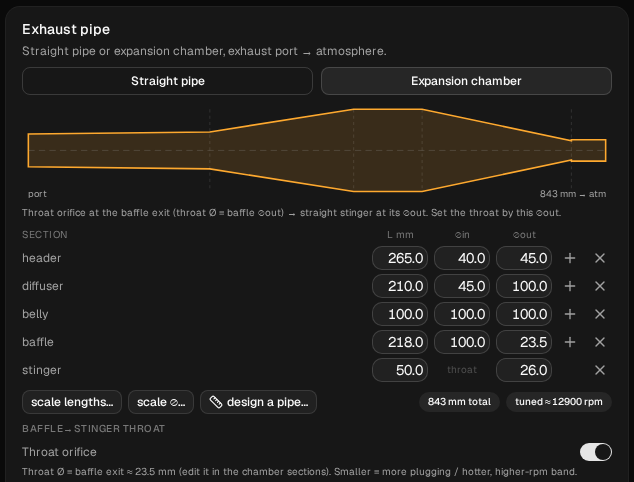
Open Build → Ducts and check the exhaust before you touch it:
- Expansion chamber is selected, with the badges 843 mm total and tuned ≈ 12900 rpm.
- The cone table reads, in mm (length / diameter in / diameter out): header 265.0 / 40.0 / 45.0, diffuser 210.0 / 45.0 / 100.0, belly 100.0 / 100.0 / 100.0, baffle 218.0 / 100.0 / 23.5, stinger 50.0 / throat / 26.0.
- The Throat orifice switch is on. That matters later: with it on, the wave diagram stops at the end of the baffle and doesn't draw the stinger.
1. Swap in a straight pipe
At the top of the Exhaust pipe card, switch from Expansion chamber to Straight pipe.
The cone table, the badges and the Throat orifice switch disappear. A straight pipe has none of them, and the tuned ≈ badge is only worked out for a chamber. The chamber isn't deleted: it's kept in the project, and switching back brings it back unchanged.
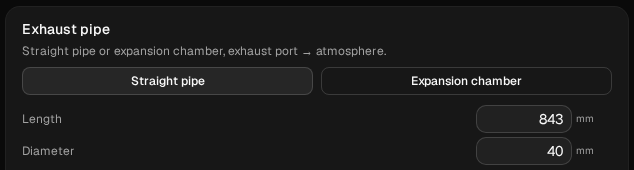
What's left are two fields, Length 1042 and Diameter 38. Those come with the template and have nothing to do with this chamber: the pipe is 199 mm longer than the chamber it replaces. Change them:
| Field | Value |
|---|---|
| Length | 843 |
| Diameter | 40 |
843 mm is the chamber's total length, port to open end. 40 mm is the bore the chamber's header starts at. With the length and the starting bore the same, the only thing that differs between the two runs is the shape: no diffuser, no belly, no baffle, no stinger. (40 mm is also what the setup wizard would give a straight pipe for this exhaust port.)
Click Run dyno. When the sweep is done, open Compare in the Dyno chart header and name the run straight pipe.
2. Put the chamber back
On Build → Ducts, switch back to Expansion chamber. Check that it's the same chamber: 843 mm total, tuned ≈ 12900 rpm, the same cone table, Throat orifice on. Don't change anything else.
Run it and name it expansion chamber.
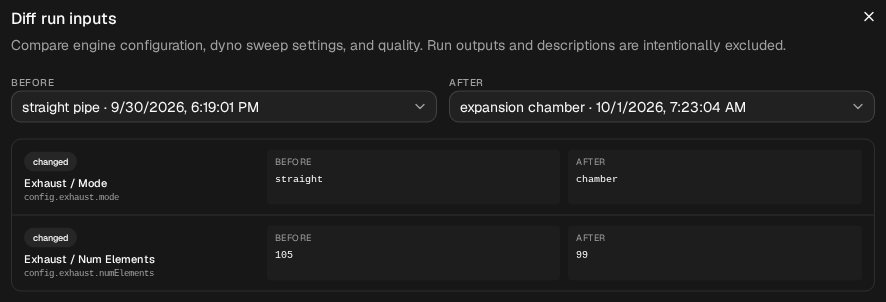
Check that only the pipe changed. Open Compare → Diff inputs. It opens on the selected run against Current model, which reads “These sources have identical simulation inputs”. Choose straight pipe as Before and expansion chamber as After. It should show two changes:
- Exhaust / Mode: straight → chamber
- Exhaust / Num Elements: 105 → 99
The second is the solver dividing the pipe into cells of the same size, not a setting. With the throat switch on, it meshes the 793 mm up to the end of the baffle here and the stinger separately. The straight pipe's 843 mm and 40 mm stay stored in the project, but the chamber run doesn't use them.
If you've done tutorial 4, this run is its baseline: same engine, same pipe, same sweep. In ours the two results were identical to the last digit.
3. The two power curves
In Compare, show both runs and click baseline on expansion chamber.
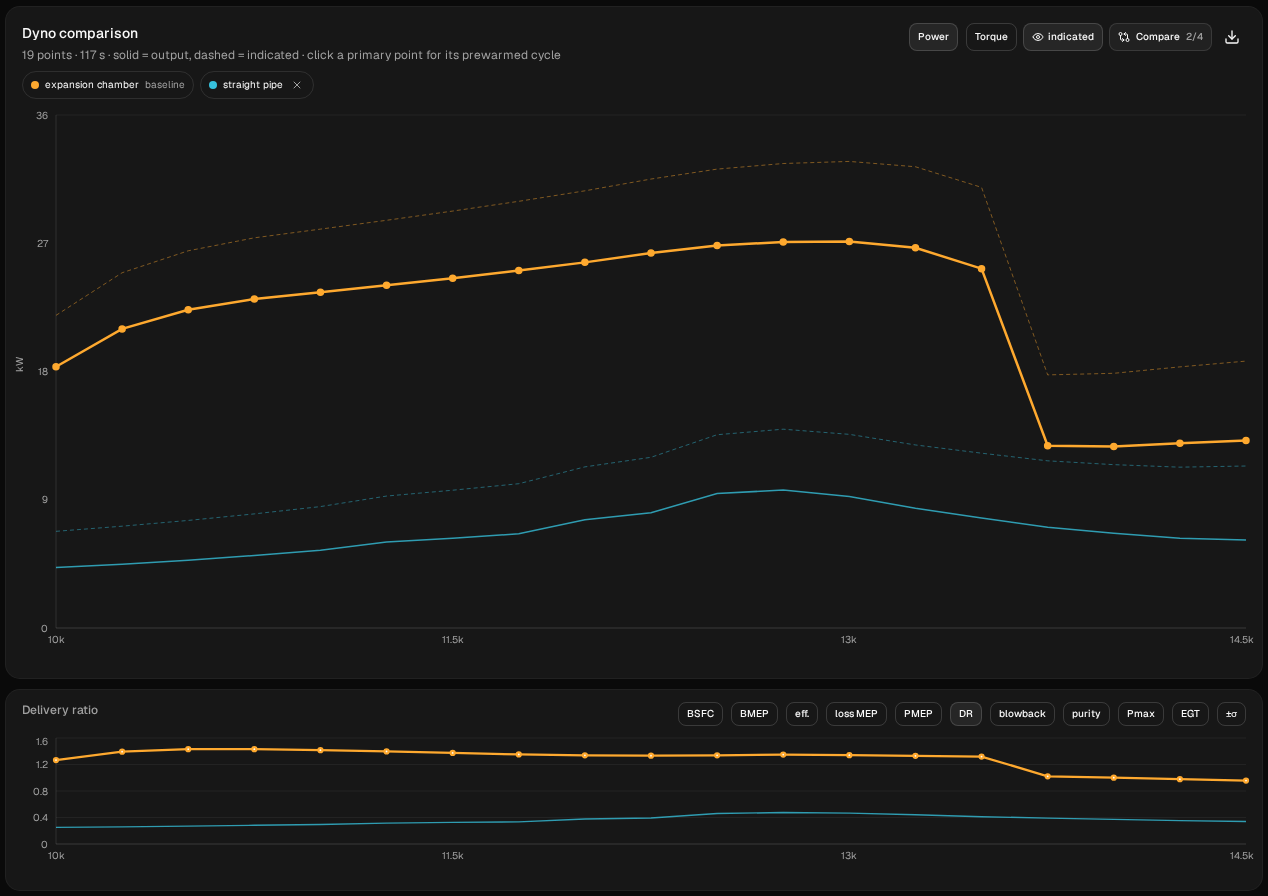
| rpm | straight pipe kW | expansion chamber kW | chamber ÷ straight |
|---|---|---|---|
| 10,000 | 4.24 | 18.33 | 4.32 |
| 10,250 | 4.48 | 20.99 | 4.69 |
| 10,500 | 4.76 | 22.33 | 4.69 |
| 10,750 | 5.09 | 23.09 | 4.54 |
| 11,000 | 5.46 | 23.57 | 4.32 |
| 11,250 | 6.04 | 24.04 | 3.98 |
| 11,500 | 6.30 | 24.55 | 3.89 |
| 11,750 | 6.61 | 25.08 | 3.79 |
| 12,000 | 7.59 | 25.66 | 3.38 |
| 12,250 | 8.09 | 26.31 | 3.25 |
| 12,500 | 9.44 | 26.85 | 2.84 |
| 12,750 | 9.68 | 27.09 | 2.80 |
| 13,000 | 9.22 | 27.13 | 2.94 |
| 13,250 | 8.40 | 26.68 | 3.18 |
| 13,500 | 7.72 | 25.22 | 3.27 |
| 13,750 | 7.07 | 12.79 | 1.81 |
| 14,000 | 6.65 | 12.73 | 1.92 |
| 14,250 | 6.30 | 12.97 | 2.06 |
| 14,500 | 6.18 | 13.16 | 2.13 |
Chamber figures in italics are off the pipe.
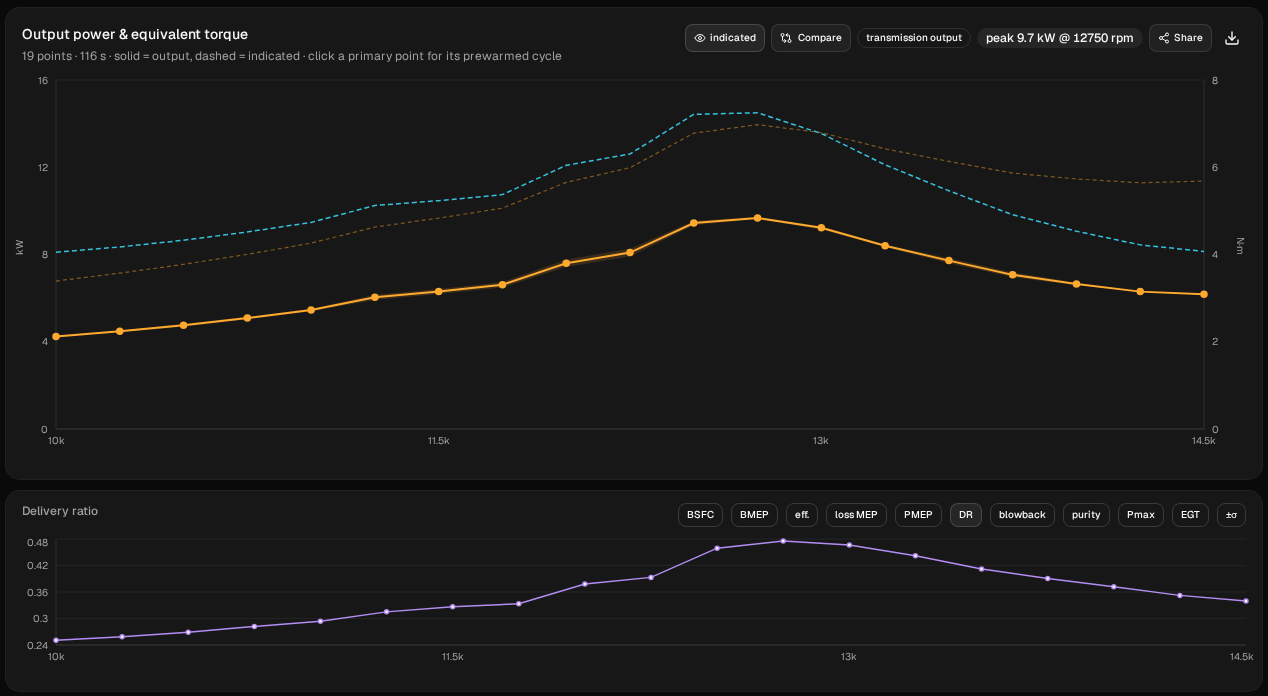
The straight pipe's best sampled point is 9.68 kW (13.0 hp) at 12,750 rpm. The chamber's is 27.13 kW (36.4 hp), one step higher at 13,000; at 12,750 it makes 27.09. On the pipe, from 10,000 to 13,500, the chamber makes 2.80 to 4.69 times the straight pipe's power at every point, 14.09 to 18.47 kW more.
The straight pipe doesn't win anywhere in this sweep. The closest it gets is just above the chamber's band: from 13,750 rpm the chamber falls off the pipe, drops from 25.22 to 12.79 kW in one step, and stays at about 13 kW. That's still 1.81 to 2.13 times the straight pipe. As in tutorial 4, read the step as “falls off somewhere between 13,500 and 13,750 rpm”.
The peak chip only shows when one run is visible. Hide one run to read the other's.
4. How much charge each pipe moved
Set the second chart under the power curve to DR, delivery ratio: the fresh charge that comes in per cycle compared with what the swept volume holds at ambient density. It counts what was delivered, not what stayed in.

- Straight pipe: 0.25 to 0.48. It delivers less than half a cylinder of fresh charge at every point, and at 10,000 rpm only a quarter.
- Expansion chamber, on the pipe: 1.27 to 1.43. More fresh charge comes in than the cylinder holds at ambient density.
- Chamber, off the pipe: 0.96 to 1.02. Still more than double the straight pipe at the same rpm, but a step down.
Then switch the chart to purity. Trapped mass isn't one of the chart's options: it's in the sweep's CSV (the download icon in the chart header) and, for a single point, on Run → Cycle analysis. Together they say what stayed in the cylinder when the port closed:
| straight pipe | chamber, on the pipe | chamber, off the pipe | |
|---|---|---|---|
| Trapped mass | 61.0 to 72.4 mg | 106.8 to 126.2 mg | 70.1 to 71.3 mg |
| Trapped purity | 0.55 to 0.78 | 0.96 to 0.97 | 0.95 to 0.96 |
On this model the straight pipe traps a charge that is between a fifth and almost half burnt gas. On the pipe, the chamber traps 65 to 91 % more mass at the same rpm, and nearly all of it is fresh. Off the pipe, the chamber's trapped mass falls most of the way to the straight pipe's (70.3 against 61.7 mg at 14,000). Section 6 shows what changed inside the pipe.
That's where the power difference comes from. The rest of this guide is about why.
5. Inside the pipe at 12,750 rpm
12,750 rpm is the straight pipe's best sampled point. The chamber's is the next one up, 13,000, but its top is flat: 27.09 kW at 12,750 against 27.13. Look at the chamber first.
Load the point. On Dyno, select expansion chamber in the run selector at the top so it's the primary run. Click the 12,750 point on its curve (hover it first to check the rpm). The app loads that point's stored cycle and opens Run → Cycle analysis: the Cylinder pressure chart is labelled 12750 rpm. Then open Run → Wave diagram. The Wave diagram doesn't show the rpm itself, so check it on Cycle analysis.
The two diagrams have to be loaded one run at a time: the Wave diagram shows the primary run's cycle.
Cycle analysis shows that one stored cycle, so its tiles can differ slightly from the power curve and the chart tooltip. The numbers in this guide come from the sweep and from the trace export, Cycle analysis → Export trace CSV.
How to read the colours
Tutorial 1 explains the axes: crank angle down the side with TDC at the top, distance from the port along the bottom, and the dashed lines for exhaust open (EO 86°), transfers open (TO 116°), bottom dead centre (BDC 180°), transfers closed (TC 244°) and exhaust closed (EC 274°). Three more things before you read this diagram:
- It shows pressure and nothing else. Not gas speed, not temperature, not where the fresh charge is. Orange is above atmospheric, blue is below, dark is close to atmospheric.
- The colour scale is centred on atmosphere and fitted to each diagram. One end is set by the biggest swing away from atmosphere in that cycle, above or below, and the other end mirrors it. That's why the chamber's colour bar at 12,750 reads −0.61 to 2.63 bar: −0.61 bar isn't a pressure anyone measured, just the mirror of 2.63. The straight pipe's reads 0.04 to 1.99 bar. The same orange doesn't mean the same pressure in two diagrams. The scale also brightens weak waves, so a pale blue patch can be a small dip. For numbers, use the trace CSV.
- The map stops at the end of the baffle, 793 mm from the port, because the Throat orifice switch is on. The 50 mm stinger after it isn't drawn, and the “→ throat” label at the right-hand edge sits at the baffle exit, not at the real open end.
The right-hand label of the colour bar can be cut off at the edge of the screen. The values above are the full ones.
The chamber
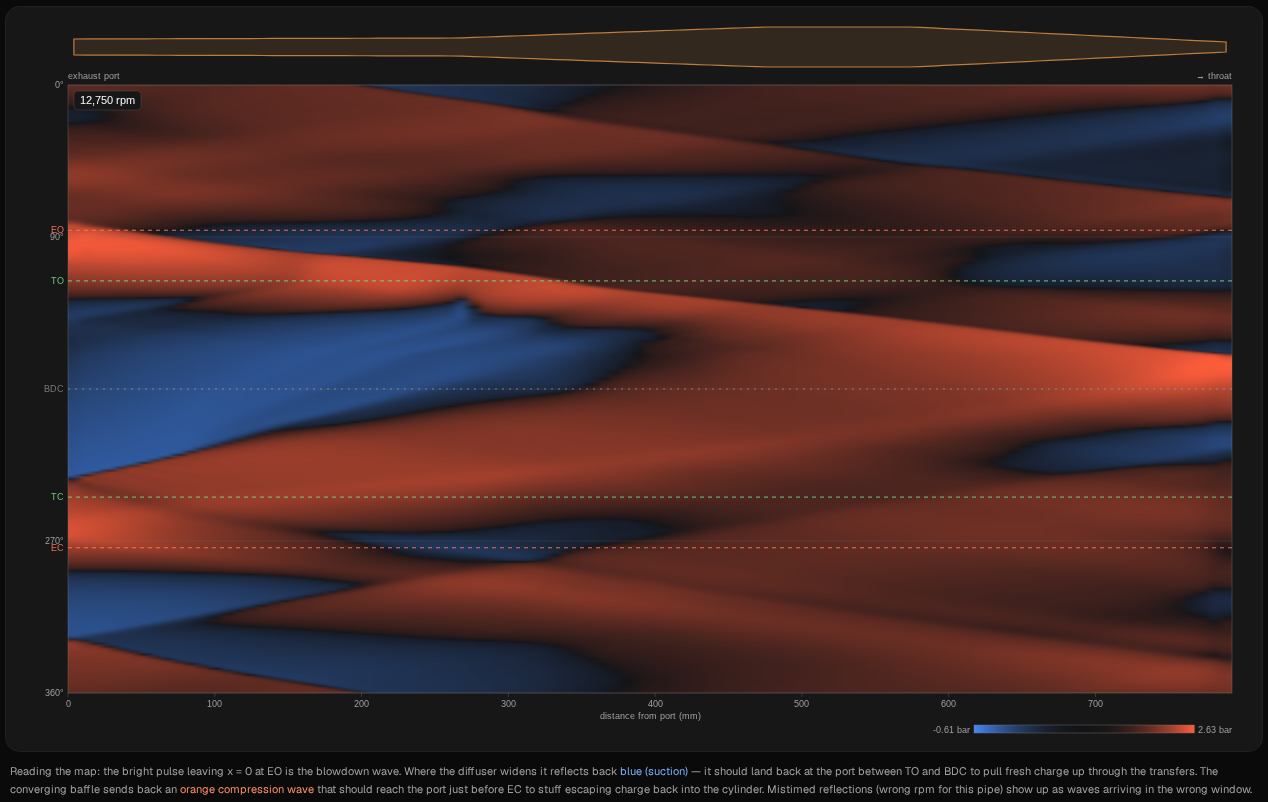
Follow the port, the left-hand edge, from top to bottom:
- The blowdown pulse. At EO the bright orange band leaves the port and runs down the pipe, slanting down and to the right as the crank turns. At the port it peaks at 2.48 bar at 105°, just after EO.
- The suction wave. The diffuser reflects the pulse back as blue. The port pressure drops below atmospheric at 134°, 18° after the transfers open, and stays below it until 234°, 10° before they close. At BDC it's 0.80 bar, and its deepest is 0.44 bar at 230°. For about three quarters of the time the transfers are open, the pipe is pulling on the cylinder. In the cylinder that shows as 1.00 bar at BDC: the pipe has pulled it down to atmospheric.
- The plugging wave. The baffle's reflection comes back as the orange band that reaches the port after TC. It peaks at 2.15 bar at 265°, 9° before EC. From 233° to 266° the exhaust flow reverses: gas goes back into the cylinder through the exhaust port, 41.1 mg of it in this cycle. That's the plugging: gas that had left the cylinder is pushed back in before the port shuts.
Both reflections land where the textbook puts them: suction while the transfers are open, plugging just before the exhaust closes.
The straight pipe
Now select straight pipe as the primary run, click its 12,750 point, check the rpm on Cycle analysis, and open the Wave diagram again.
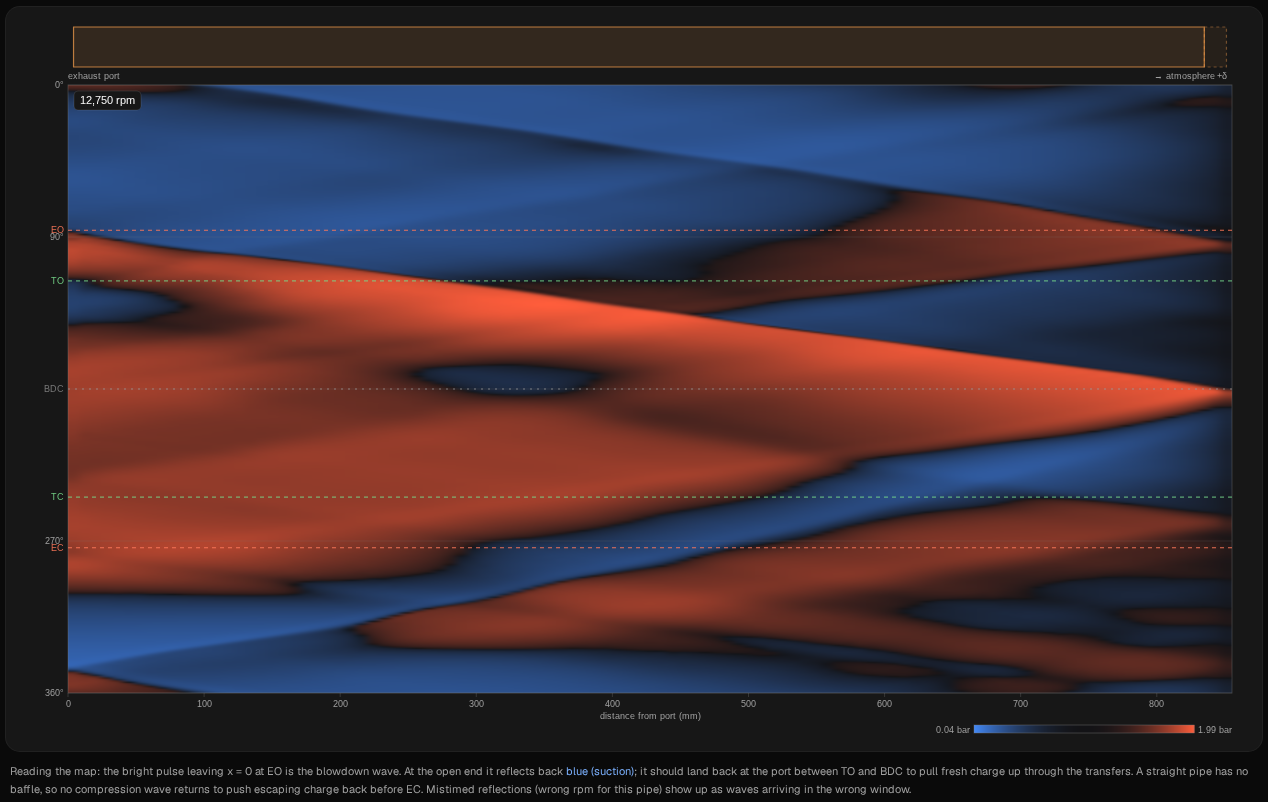
The pipe in the silhouette is a plain tube, and the map runs to its open end at 843 mm, with a faded strip marked +δ beyond it. That strip is the end correction: an open pipe reflects as though it were a little longer than it is, here about 12 mm (Applied δ on Build → Ducts).
- The blowdown pulse leaves the port at EO, as before, and peaks at the port at 1.53 bar at 101°. It runs all the way to the open end before anything sends it back.
- While the transfers are open, almost nothing pulls. The port dips below atmospheric only briefly and shallowly, from 118° to 145°, no lower than 0.86 bar. From BDC to EC it sits above atmospheric, between 1.17 and 1.39 bar, so the cylinder can't empty below that: it reads 1.37 bar at BDC.
- The suction comes back after the port has shut. An open end reflects a pressure pulse back as suction, and this pipe's is strong: the port goes down to 0.52 bar, nearly as deep as the chamber's 0.44. But it gets there at 343°, 69° after EC, with the port closed. At 10,500 and 14,000 rpm it arrives after EC as well.
- No plugging wave. There's no closing cone to make one. Only 3.3 mg flows back in through the exhaust in the whole cycle.
So a straight pipe does reflect a suction wave. It's just one wave, from 843 mm away, and it gets back too late to be any use here. The chamber's diffuser starts 265 mm from the port, so its reflection starts coming back long before the pulse reaches the end. Without that, the straight pipe ends up with the DR of 0.48 and the 22 % burnt gas you saw in step 4.
6. Below the peak and above the sampled band: why the timing moves
Go back to expansion chamber, click 10,500 and open the Wave diagram, then do the same at 14,000. 10,500 is below the chamber's best point but still on the pipe. 14,000 is above the band: the chamber has already fallen off the pipe by 13,750.
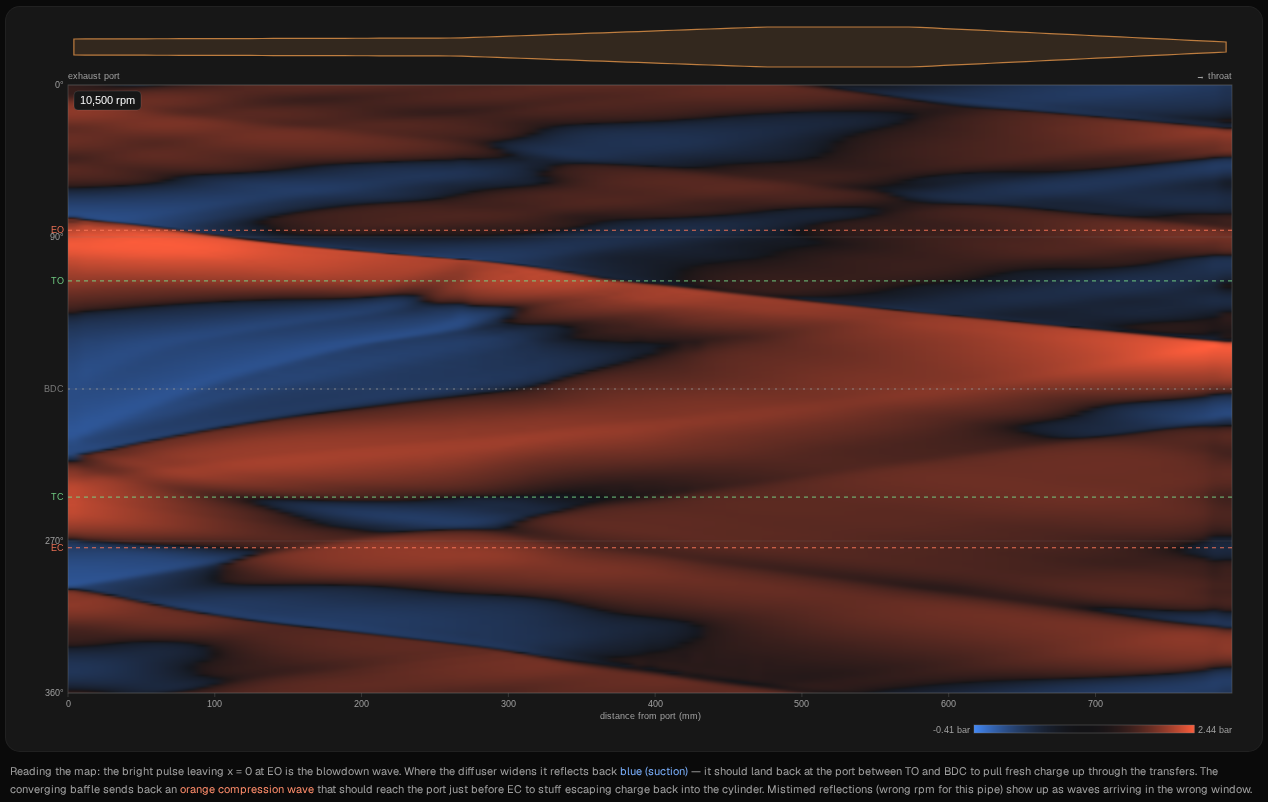
At 10,500 the waves come back early, in crank degrees.
- The suction is below atmospheric from 146° to 227°, ending 17° before TC.
- The plugging wave peaks at 1.82 bar at 252°, 22° before EC. Gas flows back into the cylinder from 223° to 251°, partly while the transfers are still open.
- By EC the plugging wave has passed: the port is below atmospheric again from 271° and reads 0.88 bar when it closes. The pipe is pulling charge out just as the port shuts.
The waves are early, but not by much, and the power shows it: 22.33 kW, 82 % of the best point.
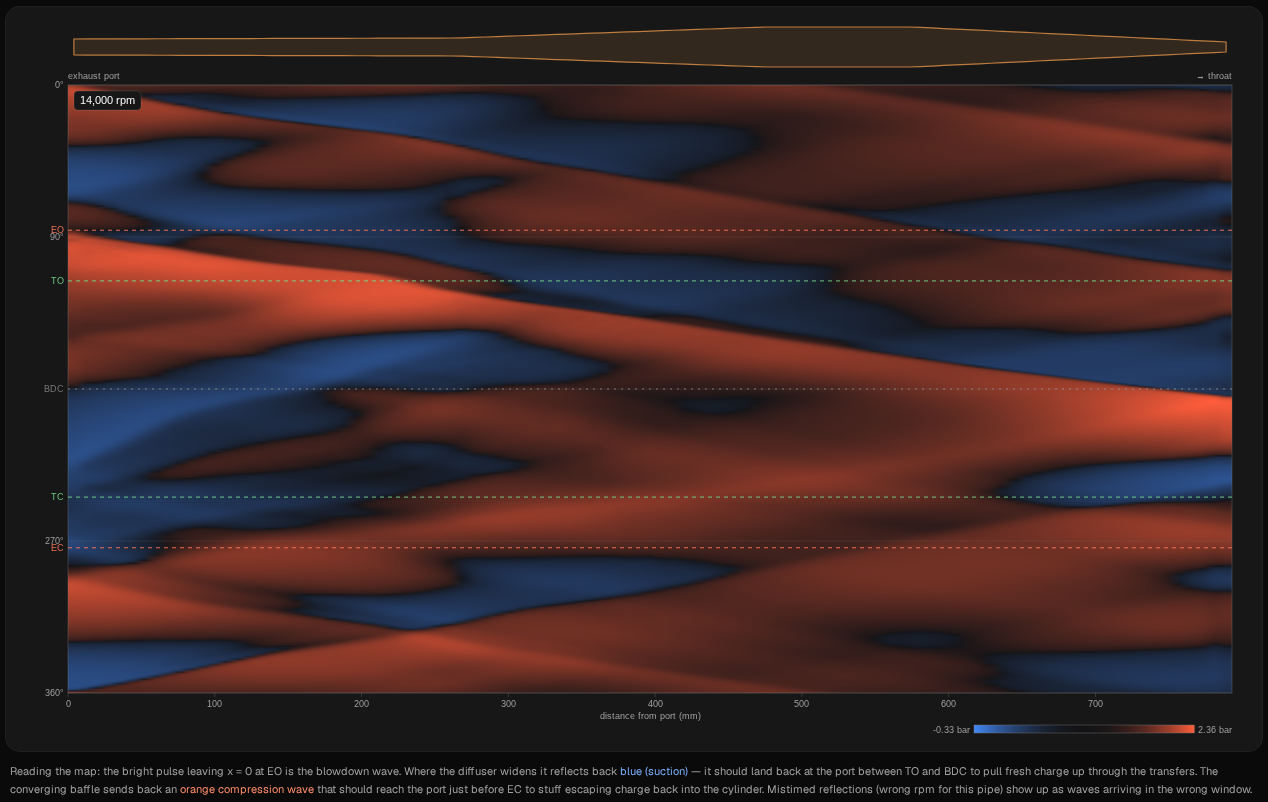
At 14,000 they come back late.
- The suction doesn't go below atmospheric until 184°, after BDC, and is still pulling when the exhaust closes: 0.76 bar at EC.
- The plugging wave peaks at 1.78 bar at 297°, 23° after EC. The port is already shut. Practically nothing flows back in through the exhaust: 0.07 mg.
That's what falling off the pipe looks like from inside. The chamber falls off between 13,500 and 13,750: the power drops from 25.22 to 12.79 kW, the trapped mass from 118.3 to 70.1 mg. At 14,000 it makes 12.73 kW and traps 70.3 mg.
Why the timing moves. The port events are fixed in degrees. The waves aren't: how long they take depends on the pipe's lengths and the gas temperature, not on the crank. As rpm rises, each degree takes less time, so the same wave arrives later in the cycle.
| rpm | Exhaust open (EO to EC) | Plugging peak, after EO | Where it lands |
|---|---|---|---|
| 10,500 | 2.98 ms | 2.63 ms | 22° before EC |
| 12,750 | 2.46 ms | 2.34 ms | 9° before EC |
| 14,000 | 2.24 ms | 2.51 ms | 23° after EC |
From 10,500 to 14,000 rpm the time the exhaust is open shrinks by a quarter, from 2.98 to 2.24 ms. The time the plugging wave takes to come back stays between 2.34 and 2.63 ms: shortest at 12,750, about 11 % less than at 10,500, and 2.51 ms at 14,000. That's under half the change in the port-open time, so by 14,000 it arrives after the port has closed, and the power is less than half the chamber's best.
That's the top of the band. This sweep starts at 10,000 rpm with the chamber still on the pipe, so it doesn't show where the band begins. Changing the pipe's lengths moves it; Compare two pipes and tutorial 4 show what moving it does to the power curve. A dent can move it without changing any length: on this engine, a 12 mm dent 6 in down the header brought the drop off the pipe forward, from between 13,500 and 13,750 rpm to between 12,500 and 12,750.
What to take from it
On this model, with this engine:
- The expansion chamber made 2.80 to 4.69 times the straight pipe's power on the pipe, and about twice as much off it. The straight pipe was behind at every one of the 19 points.
- The difference is charge. The chamber delivered 1.27 to 1.43 cylinders of fresh charge on the pipe and trapped 96 to 97 % fresh charge. The straight pipe delivered 0.25 to 0.48 and trapped 22 to 45 % burnt gas.
- The waves explain the charge. At 12,750 rpm, at the top of the chamber's band, its suction held the port below atmosphere for about three quarters of the time the transfers were open, and its plugging wave pushed charge back in 9° before the exhaust closed. The straight pipe's suction wave was nearly as strong, but it got back to the port after the exhaust had closed.
- The band is a timing window. At the lower sampled rpm the plugging wave arrived early; above the band, after the port had closed. The tuned ≈ badge on Build → Ducts is the app's rough estimate of that band; tutorial 4 shows how well it tracks the fall-off on this engine.
That's the answer to “why do 2 strokes need an expansion chamber”, on one engine you can check. To see it on yours:
- Build your own engine and pipe with the setup wizard (tutorial 1), and run it once as it is.
- Switch to a straight pipe of the same length, with the header's starting bore, and run it again. Then load the same rpm in both and compare the wave diagrams.
- Look at a point either side of your peak. Where the plugging wave lands relative to EC tells you whether it arrives early or late at that rpm.
These are simulated estimates from a 1D gas-dynamics model of a generic engine, not measurements, and not your engine. The model isn't calibrated against a dyno. Even the differences between the runs hold only for this model. It shows falling off the pipe as a sharp step, sharper than a real dyno. Use WaveDyno to compare designs and to understand what the pipe is doing, and confirm on a real dyno before building. See the Terms of Service, section 4.