Expansion chamber calculator: design a 2-stroke pipe for a target rpm, then sweep it
Tutorial 9 · about 10 minutes plus four sweeps
WaveDyno's calculator scales a known chamber to your engine. From your port timing and the rpm you want, it sets the pipe's length so a pressure wave can travel out and back in the time the port timing allows: the higher the rpm, the shorter the pipe. That rule gives you a length, not a result. Where the pipe peaks, and where it falls off, is what a sweep in the app checks.
WaveDyno has a calculator built in, the design a pipe… button on the Ducts tab. This guide uses it to design a pipe for 12,000 rpm on the app's 125 cc moto-X engine, then sweeps that pipe to see where it really makes its power, and where it stops. Then it tries the calculator's Power level setting, and a pipe for 13,800 rpm.
What the page can't answer:
- Your engine. The example is the app's 125 moto-X archetype, the engine of tutorials 1, 2, 4 and 5. It isn't a YZ125, a KTM 125 or anyone's actual engine. The calculator works on whatever engine your project has; the gap between target and peak on yours is for your own sweep to show.
- A real pipe on a real dyno. The sweep is a 1D simulation of the pipe the calculator drew. A fabricated pipe has seams, bends, a silencer and a wall temperature of its own. The model isn't calibrated against a dyno, so even the differences between two pipes on this page hold for this model engine, not as a prediction for a real one.
- Whether the calculator's starting shape is the best one. It scales a known chamber; it doesn't invent one. The dialog says so itself: “A starting point to sweep and tune — not a finished design.”
Everything here runs on WaveDyno's free plan with daily run limits. Each sweep has 19 points and counts against the daily limit; the Run dyno button shows the estimate before you start (16.2 to 17.0 units for each sweep here). A finished sweep is charged what it actually used, up to its estimate. Depending on what you've already run today and what each sweep is charged, you may not get through them all in one UTC day. The app refuses a run whose estimate doesn't fit in what's left of the day, and the limit resets at midnight UTC. Your runs stay in the project, so you can pick up where you stopped.
The engine
Create a new project with the setup wizard (the + button, as in tutorial 1), pick 125 moto-X / enduro, keep every answer at its default and create it. Then on Run → Setup, set the sweep to 10,000 to 14,500 rpm in 250 rpm steps, quality Standard: the same sweep as tutorial 4.
One thing that may puzzle you on the way: the wizard's pipe step shows a Target peak rpm of 12,500, but the Ducts tab's badge reads tuned ≈ 12900 rpm. At default answers the wizard keeps the template's own pipe as built rather than designing a new one, so the 12,500 isn't what the pipe was made for. The badge is the number to go by.
Run the sweep and name it baseline. Tutorial 5 reads this same run in detail; the short version:
- Best point 27.129 kW (36.4 hp) at 13,000 rpm, 100 rpm over the badge's 12,900.
- On the pipe all the way to 13,500, still 25.219 kW there.
- By 13,750 it has fallen off the pipe: 12.795 kW, less than half. The drop happens somewhere between 13,500 and 13,750; a 250 rpm sweep doesn't locate it more closely. Tutorial 5, section 6 shows in the wave diagram why: the plugging wave comes back after the port has closed.
So on the template pipe, the badge lands just under the highest sampled point, and the last point on the pipe, 13,500, is 600 rpm past the badge.
1. Open the calculator
Go to Build → Ducts. Above the section table, next to scale ⌀…, is design a pipe…. It opens Design a starting pipe with three settings:
- Template: which known chamber's proportions to scale: Road race 125, Moto-X / enduro 125 or 100 cc kart.
- Target peak rpm: the rpm to tune for.
- Power level: Mild (broad, cooler), Strong (donor as-built) or Max (peaky, hotter). It changes only the baffle exit and the stinger.
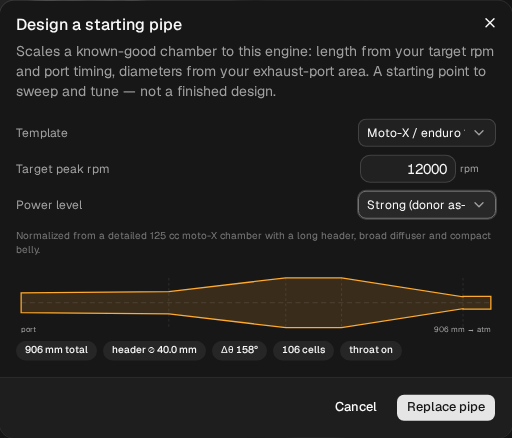
It always opens on Road race 125, whatever your engine, with the target taken from your current pipe's badge (13,000 here, the 12,900 rounded to the nearest 250). Switch the template to Moto-X / enduro 125 every time, or you'll scale a different chamber.
How it gets the lengths: the time between the exhaust opening and the transfers closing is the window the pipe has to work in. On this engine that's 158° of crank (the Δθ badge). The calculator makes the distance from the port to the middle of the baffle as long as a pressure wave travels out and back in that time at the target rpm, using a fixed wave speed. Every section then keeps its share of that length from the template. The diameters come from your exhaust port's area: the header bore is sized to the port, and the rest follows the template's ratios. Here that gives a 40.0 mm header, the same as the engine already has.
The tuned ≈ badge on the Ducts tab uses the same rule with the same wave speed, so a pipe designed for 12,000 will always read tuned ≈ 12000. The badge isn't a second opinion on the calculator. The sweep is.
2. Design a pipe for 12,000 rpm
Set Moto-X / enduro 125, 12000, Strong. Before you apply it, the preview reads 906 mm total, header ⌀ 40.0 mm, Δθ 158°, 106 cells, throat on. Click Replace pipe.
The Ducts table now reads:
| Section | L mm before | L mm after | ⌀ out before | ⌀ out after |
|---|---|---|---|---|
| header | 265.0 | 284.8 | 45.0 | 45.0 |
| diffuser | 210.0 | 225.7 | 100.0 | 100.0 |
| belly | 100.0 | 107.5 | 100.0 | 100.0 |
| baffle | 218.0 | 234.3 | 23.5 | 24.0 |
| stinger | 50.0 | 53.7 | 26.0 | 26.0 |
and the badges 906 mm total and tuned ≈ 12000 rpm. Going from 12,900 to 12,000 is 7.0 % lower, and every length grows by 7.5 %, so the port to mid-baffle distance goes from 684 to 735 mm.
Two things in that table aren't the target at work:
- The baffle exit went from 23.5 to 24.0 mm. The calculator rounds diameters to the whole millimetre, so even at 12,900 it wouldn't give back the template pipe exactly: its 12,900 pipe has a 264.9 mm header and the same 24.0 mm baffle exit. Half a millimetre on the throat is small next to 51 mm of length, but it's there.
- The stinger's ⌀ in cell reads “throat”, not a number, because this pipe has a baffle-to-stinger throat: the restriction is the baffle's exit, and the stinger after it is wider.
Before you run it, check what changed with Compare → Diff inputs against baseline (tutorial 2 shows where it is). You'll see the five lengths, the baffle's ⌀ out and Num Elements going from 99 to 106: that's the solver dividing the longer pipe into more cells at the same cell size, not a setting.
3. Run it: where does it peak?
Run the sweep, name it design 12000, and in Compare set baseline as the baseline.
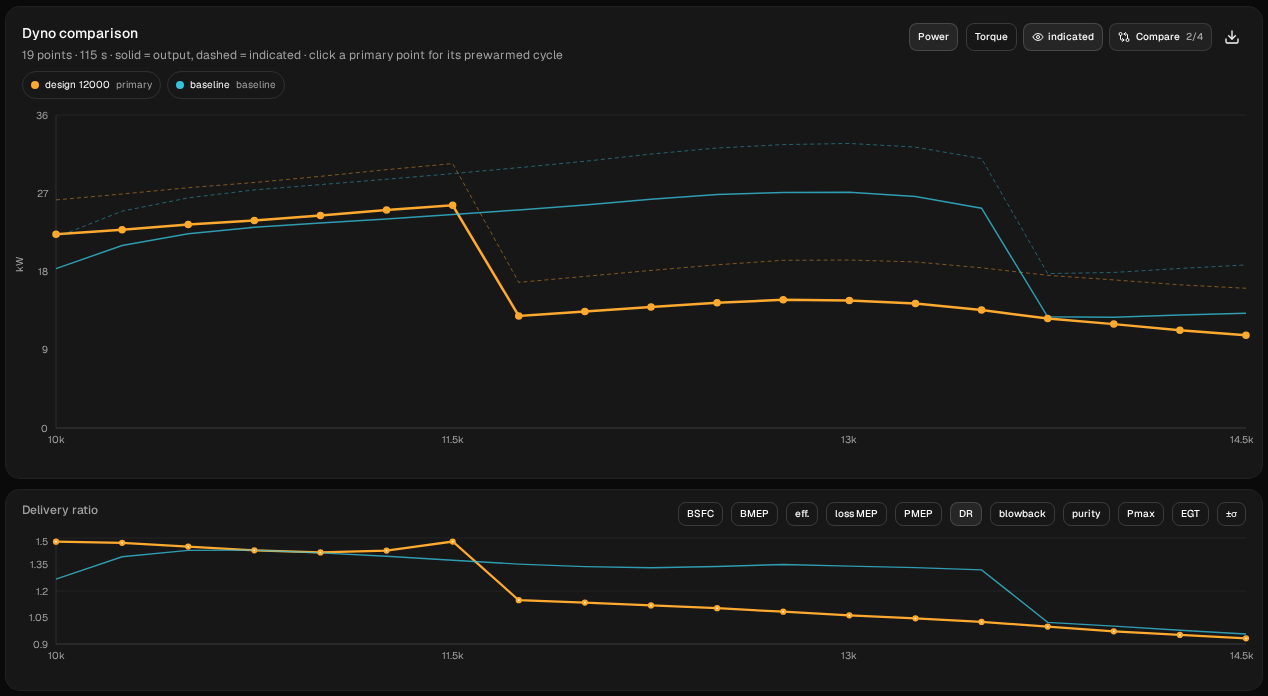
| rpm | baseline kW | design 12000 kW | change kW |
|---|---|---|---|
| 10,000 | 18.331 | 22.282 | +3.951 |
| 10,250 | 20.989 | 22.816 | +1.826 |
| 10,500 | 22.329 | 23.406 | +1.077 |
| 10,750 | 23.088 | 23.876 | +0.788 |
| 11,000 | 23.565 | 24.441 | +0.875 |
| 11,250 | 24.045 | 25.062 | +1.017 |
| 11,500 | 24.550 | 25.612 | +1.062 |
| 11,750 | 25.083 | 12.890 | −12.193 |
| 12,000 | 25.658 | 13.411 | −12.247 |
| 12,250 | 26.314 | 13.923 | −12.391 |
| 12,500 | 26.845 | 14.400 | −12.445 |
| 12,750 | 27.086 | 14.745 | −12.342 |
| 13,000 | 27.129 | 14.655 | −12.473 |
| 13,250 | 26.678 | 14.326 | −12.353 |
| 13,500 | 25.219 | 13.559 | −11.659 |
| 13,750 | 12.795 | 12.605 | — |
| 14,000 | 12.732 | 11.947 | — |
| 14,250 | 12.972 | 11.237 | — |
| 14,500 | 13.164 | 10.676 | — |
Italics: off the pipe. Every point converged in both runs.
Read it in three parts.
Below the target, it does what a longer pipe should. The designed pipe makes more power at every point up to 11,500: +0.79 to +1.06 kW from 10,750 to 11,500, and +3.95 kW (+21.6 %) at 10,000, where the template pipe is still coming onto the pipe.
Its highest sampled point is under the target: 25.612 kW (34.3 hp) at 11,500 rpm, 500 rpm under the 12,000 it was designed for. The template pipe's highest sampled point was 100 rpm over its badge. For these two pipes, the target was a rough guide to where the highest sampled point landed: within two sweep steps of it. Section 5 shows a higher target where it wasn't.
But it is off the pipe before the target. The drop happens somewhere between 11,500 and 11,750. At 11,750 the power is down to 12.890 kW, 50 % of the point before, and the trapped charge from 126.02 to 70.43 mg. From there up it's 11.7 to 12.5 kW below the template pipe all the way to 13,500. The template pipe's last point on the pipe was 600 rpm past its badge; this one's is 500 rpm under its own. Its best point is 1.516 kW below the template pipe's, and it's the last point before the drop.
Lowering the target 900 rpm moved the highest sampled point down 1,500 rpm and the observed drop bracket down 2,000.
| Pipe | tuned ≈ | Best point | Last point on the pipe | First point off the pipe |
|---|---|---|---|---|
Template pipe (baseline) | 12900 | 27.129 kW at 13,000 | 13,500 | 13,750 |
| Designed for 12,000 | 12000 | 25.612 kW at 11,500 | 11,500 | 11,750 |
These are this sweep's numbers with the app's calibration as it is today. If WaveDyno recalibrates its wave speed, the calculator and the badge change together. A pipe newly designed for 12,000 will still read tuned ≈ 12000 (give or take rounding), but its lengths will be slightly different. The template pipe keeps its lengths, and its badge will read a different rpm from 12900. The method doesn't change: design, then sweep, and read the peak and the drop off the sweep, not the badge.
Why does the band end so abruptly? This model's pipes come off the pipe in one step, as in tutorials 4 and 5: when the returning wave misses the port, the engine drops to a different way of running, with about half the power. A real engine on a real dyno tails off more gently. Tutorial 5 shows what happens inside the pipe at that point, and tutorial 4 how a port change moves it.
4. The power level: Max against Strong
The dialog's Power level changes only the stinger end: Max (peaky, hotter) multiplies the baffle exit and the stinger diameter by 0.93, 7 % narrower before the calculator rounds them to the whole millimetre, so the dimensions you see don't shrink by exactly 7 %. Its tooltip says: “Smaller stinger = stronger plugging, hotter and peakier; larger = broader and cooler.”
To test that on the pipe you already know, open the calculator again and set Moto-X / enduro 125, 12900, Max (peaky, hotter), then Replace pipe. The lengths come back to the template's (header 264.9 mm), and the stinger end changes:
| Template pipe | 12900, Max | |
|---|---|---|
| baffle exit (the throat) | 23.5 mm | 22.0 mm |
| stinger bore | 26.0 mm | 24.0 mm |
| Ducts | 843 mm, tuned ≈ 12900 | 842.9 mm, tuned ≈ 12900 |
On both pipes the stinger's ⌀ in cell reads throat: with the throat on, the solver models the stinger as a straight tube at its ⌀ out, so the bore is the ⌀ out figure. (The project also stores a stinger ⌀ in, 22.0 mm on the template pipe and 20.0 mm on the Max pipe, which Diff inputs will list; the solver doesn't use it while the throat is on.)
Run it as design 12900 max and compare it with baseline, then switch the lower chart to EGT. EGT here is the exhaust-gas temperature the model reports at its probe, 120 mm from the exhaust port (the EGT probe field under the Ducts tab's Model calibration), not a pipe-wall temperature.
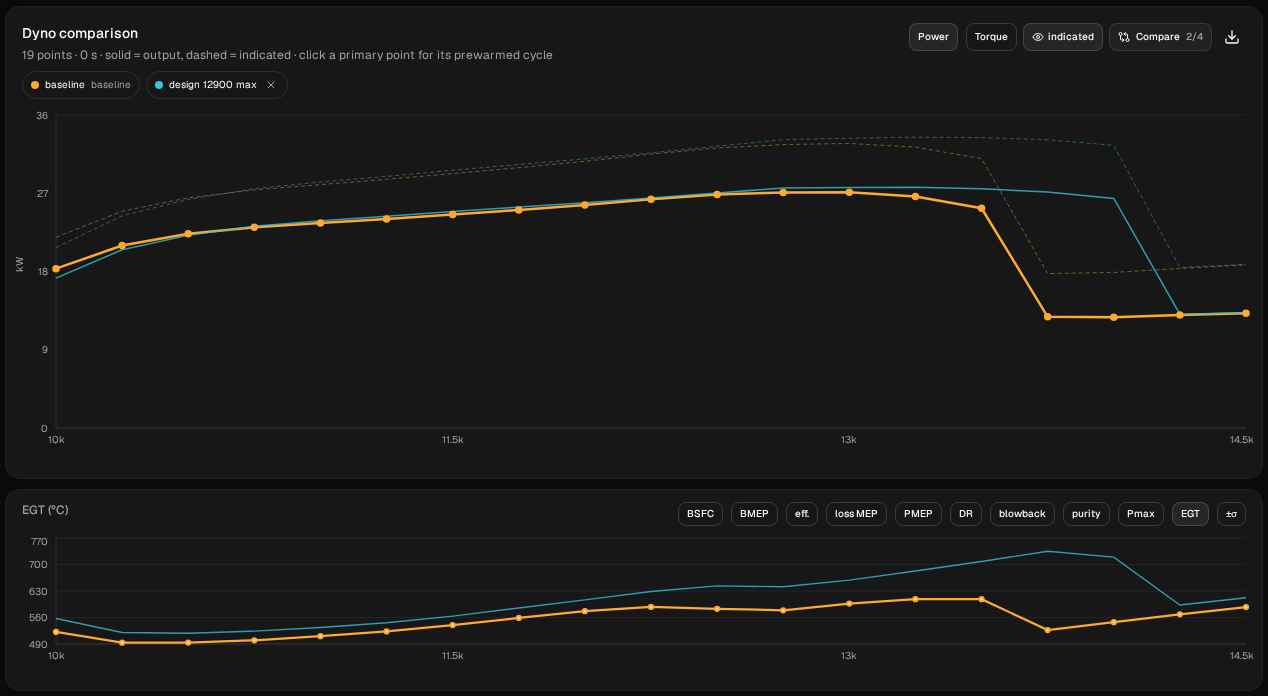
- Hotter: yes. Its exhaust-gas temperature at the 120 mm probe is 22.9 to 101.5 °C above the template pipe's at every point from 10,000 to 13,500, where both are on the pipe.
- More peak power: a little, at the sampled points. Its highest sampled point is 27.668 kW (37.1 hp) at 13,250, 0.539 kW more than the template pipe's, and 250 rpm higher. On a 250 rpm sweep that doesn't locate either peak.
- Peakier: not on this sweep. It lost low down (−1.093 kW at 10,000, −0.490 at 10,250) and gained high up (up to +2.292 kW at 13,500), and it stayed on the pipe two steps longer: 27.168 kW at 13,750 and 26.336 kW at 14,000, where the template pipe had already fallen to 12.795 and 12.732. It traded the bottom of the band for the top rather than narrowing it.
So in this model, the narrower stinger end moved the top of the band up by two sweep steps, raised the exhaust-gas temperature at the probe, and cost low-down power. The model isn't calibrated against a dyno, so treat even these differences as this model engine's, not a prediction for yours. For the other direction, a bigger stinger end, and what the stinger's length does, see Stinger size on a two-stroke pipe.
5. A higher target
The natural next step is the other way: a pipe for 13,800 rpm, 900 above the template. Open the calculator again and set Moto-X / enduro 125, 13800, Strong. The preview reads 788 mm total and 92 cells. After Replace pipe, the Ducts tab reads 787.9 mm total and tuned ≈ 13800 rpm, with a 247.7 mm header. Run it as design 13800 and compare it with baseline.
- The sweep doesn't find the peak. Its highest sampled point is the last one, 25.755 kW (34.5 hp) at 14,500 rpm: 1.373 kW below the template pipe's best, and 700 rpm over the 13,800 it was designed for. Taking 900 rpm off the target moved the highest sampled point down 1,500; adding 900 put it at the end of the sweep, so this sweep can't say where the peak is.
- It's weaker almost everywhere the template pipe is on the pipe. From 10,000 to 13,250 it makes 0.97 to 6.31 kW less at every point, most at the bottom of the sweep: 14.251 kW at 10,000 against 18.331, and 6.31 kW less at 10,500. At 13,500 the two are level.
- It stays on the pipe to the top of the sweep. There's no drop anywhere up to 14,500. After a first hump at 12,750 it sags to 24.960 kW at 13,750, then climbs back to 25.755 kW at 14,500, its highest sampled point, so it's within 10 % of its best from 11,500 to the end of the sweep (the template pipe: 11,500 to 13,500). At 14,000, where the template pipe has fallen to 12.732 kW, it makes 25.100; at 14,250, where the Max pipe has come off too, 25.422. Where it would come off the pipe, this sweep doesn't show.
| Pipe | tuned ≈ | Best point | Last point on the pipe | First point off the pipe |
|---|---|---|---|---|
| Designed for 12,000 | 12000 | 25.612 kW at 11,500 | 11,500 | 11,750 |
Template pipe (baseline) | 12900 | 27.129 kW at 13,000 | 13,500 | 13,750 |
| 12900, Max | 12900 | 27.668 kW at 13,250 | 14,000 | 14,250 |
| Designed for 13,800 | 13800 | 25.755 kW at 14,500, the end of the sweep | 14,500, the end of the sweep | none by 14,500 |
The higher target kept this sweep on the pipe to 14,500, with less power at every sampled point to 13,250 and level power at 13,500. Its highest sampled power was lower, but its peak remains unlocated. That's this engine's answer, not a rule; on yours, sweep it.
Every point of this sweep converged, with a delivery ratio of 1.04 to 1.37, and no warning banner appeared. All the same, read the delivery-ratio column before you read power off any sweep of a designed pipe: a point with a delivery ratio near 0, or negative power, isn't a result. The app's warning banner names points with a delivery ratio near 0 and points that didn't settle, but negative power alone doesn't put a point on it, so check the column too.
Tutorial 4 kept the engine on the pipe to the top of the same sweep a different way: a shorter header, on an engine with a raised port.
What to take from it
- Use the calculator as a starting pipe, then sweep it. It scales the lengths to a target in a few seconds. On this engine, a pipe designed for 12,000 had its highest sampled point at 11,500, the template pipe 100 rpm over its badge, and a pipe designed for 13,800 at 14,500, the end of the sweep.
- Read where the band ends, not only the peak. The 12,000 pipe was already off the pipe before its target (it came off between 11,500 and 11,750); the template pipe stayed on to 13,500, 600 rpm past its badge, and came off between 13,500 and 13,750. The 13,800 pipe was still on the pipe at 14,500, the top of the sweep: its peak remains unlocated. If you need the engine to pull past a given rpm, sweep past it and look.
- Change one thing at a time. Designing a new pipe changes all five lengths at once (and here the baffle exit by half a millimetre). The length rule is the same one the moped pipe used in tutorial 3, step 7, where the badge's 7,000 wasn't borne out by the sweep at all. On this 125 the highest sampled point landed 500 rpm under the target for 12,000, 100 rpm over the badge for the template pipe, and at the end of the sweep for 13,800; on the 50 cc it didn't land near the badge at all. That's why you sweep.
- The power level moves the stinger end, and that moves heat as well as power. Max's exhaust gas ran 23 to 101 °C hotter at the 120 mm probe here, for 0.5 kW at the highest sampled point, in this model.
Next: tutorial 6, step 5 asks what pipe a 70 cc kit on a 50 cc moped would want, and gets the lengths and diameters from the setup wizard, which scales its pipes the same way, without sweeping them. With this dialog you can put that kind of pipe on an existing project and sweep it in the model first. The sweep shows how the model engine responds to it; it isn't a dyno result for the pipe you'd build.